How to transcribe WhatsApp voice messages (built-in transcripts, languages and alternatives)

You're in a meeting, a client sends a three-minute voice note, and you can't play it out loud. Later you need the delivery date they mentioned, so you scrub back and forth through the audio trying to find the 20 seconds that mattered. Then a supplier sends one in Hindi mixed with English, and the transcript button gives you nothing useful.
To transcribe WhatsApp voice messages, turn on Voice message transcripts in Settings, then Chats, pick the language most of your voice notes are in, and then press and hold any voice note you receive and tap Transcribe. It runs on your phone and only you see the text, but it works on Android and iPhone only, in a short list of languages, one language at a time. For voice notes in other languages, mixed languages or on your computer, an assistant that reads your WhatsApp, like Perisclaw, can transcribe and translate any voice note you point it at and pull out what you need to act on.
How to turn on WhatsApp voice message transcripts
Transcripts are off by default, and you turn them on once per phone.
On Android:
Open WhatsApp Settings and tap Chats.
Turn on Voice message transcripts.
Tap Choose language and pick the language most of the voice notes you receive are in.
Tap Set up now, or Wait for Wi-Fi if you'd rather download the language pack later.
On iPhone:
Make sure Siri is turned on. WhatsApp needs it for transcripts, and iOS 16 or newer.
Open WhatsApp Settings (or tap your profile picture) and tap Chats.
Turn on Voice message transcripts, tap Choose language, pick one and confirm.
If Siri was off before you started, WhatsApp asks you to download the language you chose.
How to see a transcript
Press and hold a voice note you received and tap Transcribe. The text appears under the voice note after a moment, and you can tap it to expand the full transcript.
The transcript is made on your phone and only the person who receives the voice note sees it, so the sender can't see your transcript.
Which languages WhatsApp transcripts support
The list depends on your phone, and it's shorter than most people expect. As of November 2026, WhatsApp's help centre lists:
Phone | Supported transcript languages |
|---|---|
Android | English, Portuguese, Spanish, Russian |
iPhone, iOS 16 | English, Arabic, Chinese, French, German, Italian, Japanese, Korean, Portuguese, Russian, Spanish, Turkish |
iPhone, iOS 17 and newer | The iOS 16 list plus Danish, Dutch, Finnish, Hebrew, Malay, Norwegian, Swedish and Thai |
WhatsApp Web, Windows, Mac | Not offered yet, per WhatsApp's help centre |
Android is moving faster than its help page. WABetaInfo's September 2026 report lists Arabic and Hindi among the languages Android already offers, with a beta adding more variants of English, German, French, Italian and Japanese. So check Choose language on your own phone, because what you see there is what you have.
The limits of WhatsApp's built-in transcripts
Built-in transcripts are free and private, and for the odd voice note in a supported language they're all you need. Where they fall short for work:
One language at a time: you pick a single transcript language. If your clients send voice notes in Spanish and your team in English, one of them won't transcribe properly until you switch the setting, and switching it off resets your choice.
Mixed-language voice notes: a voice note that moves between Hindi and English mid-sentence doesn't fit a one-language model, and that's how a lot of people actually talk.
Not on your computer: if you work in WhatsApp Web or the desktop app all day, you have to pick up your phone to read a transcript.
Accuracy: WhatsApp itself says transcripts may be inaccurate. Names, amounts and addresses are the words most likely to come out wrong, and the ones you most need right.
Text, not answers: you get the words. Finding the one date in a three-minute ramble, or turning "can you send the revised quote and also check with Ramesh" into two tasks, is still on you.
Other ways to transcribe a WhatsApp voice note
Upload the audio to ChatGPT: ChatGPT can transcribe an audio file and answer questions about it, and it accepts common formats including OGG, MP3 and M4A. Get the voice note's audio file out of WhatsApp (by sharing it or exporting the chat with media), upload it, and ask for a transcript. Audio uploads need a paid ChatGPT plan; the free plan doesn't take audio, and OpenAI says quality varies by language. You're also sending a recording of someone else's voice to a third party, so think about whose voice note it is.
Export the chat with media: WhatsApp's Export chat with Include media attaches recent voice notes as audio files. It gets a batch out at once, but only the most recent media comes with it.
Transcribe any WhatsApp voice note in your language with Perisclaw
Perisclaw is Your Executive Assistant on WhatsApp. It connects to the number you already use as a linked device, the same way WhatsApp Web does, so it can read the voice notes in your chats without you forwarding or exporting anything. You ask it in your self-chat (the chat with your own name), by typing or by sending a voice note.
It understands most widely used languages, and there's no language setting to choose first. A voice note in Portuguese, one in Hindi and English, and one in Arabic can all come in on the same morning.
What you can ask:
A verbatim transcript: "Transcribe the last voice note from Priya."
Transcribe and translate: "Transcribe the last audio in the vendors group and translate it to English."
The one detail: "What delivery date did the supplier give in that voice note?"
The gist: "What did my accountant say in her voice note? Just the action points."
Because it's reading the transcript, not just showing it to you, Perisclaw can do the next step too. A promise in a voice note ("I'll send the signed copy by Thursday") becomes a task it tracks, and things people owe you show up in your morning briefing.
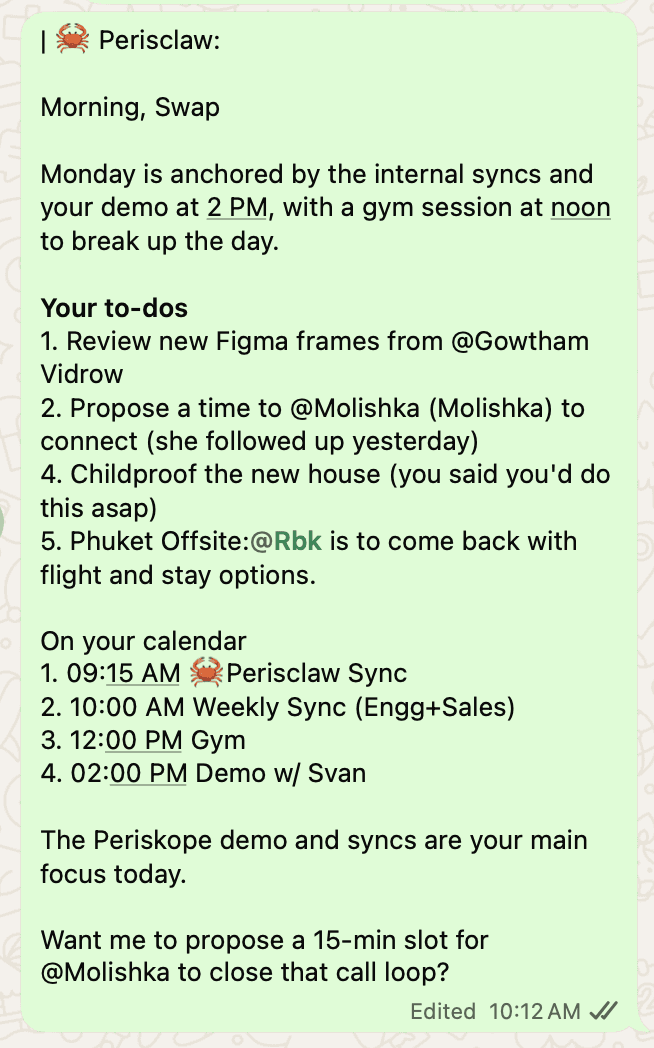
For summaries of whole groups, see how to summarize WhatsApp groups and voice notes with AI, and for sending emails or creating Notion tasks straight from a voice note, see turn WhatsApp voice notes into emails and tasks. The full feature list is in the Voice guide.
What to know before you rely on it:
It's not on your phone: unlike WhatsApp's on-device transcripts, Perisclaw processes the audio in your own isolated, encrypted environment. Your messages are never used to train AI models, and Perisclaw is ISO 27001 certified. Any chat you block in its settings, or lock with WhatsApp's Chat Lock, is off limits to it entirely.
Check the numbers: like any transcription, it can mishear a name or an amount, so for a bank detail or a price, play that part back before you act on it.
The linked-device caveat: WhatsApp didn't build linked devices for outside tools, and its help centre warns that linking unofficial apps can lead to a ban. Perisclaw is built for normal personal use like reading your own chats, it stops after 15 chats if you ask it to send the same message to many, and nobody outside WhatsApp can promise zero risk.
Which option should you use?
WhatsApp's built-in transcripts if your voice notes are mostly in one supported language and you read them on your phone.
ChatGPT if you're already paying for it and need the odd long recording transcribed.
Perisclaw if you get voice notes in several languages, read WhatsApp on a computer, or want the date, the amount or the task pulled out for you, not just the text. There's a 7-day free trial with no card, so try it on your hardest voice note.
FAQ
Can WhatsApp transcribe voice messages automatically?
Yes, on Android and iPhone. Turn on Voice message transcripts in Settings, then Chats, and pick a language. You then press and hold a voice note and tap Transcribe to see its text. It's off by default.
Why don't I see the Transcribe option?
Usually because transcripts aren't turned on, your language isn't supported on your phone, or, on iPhone, Siri is off or you're on a version older than iOS 16. WhatsApp also says the feature is only on certain devices, and it isn't on WhatsApp Web or the desktop apps yet.
Can the sender see that I transcribed their voice note?
No. Transcripts are made on your phone and only you can see them.
Can WhatsApp transcribe Hindi voice notes?
WhatsApp's help centre doesn't list Hindi for Android or iPhone, though WABetaInfo's September 2026 report says Android already offers it. Perisclaw understands Hindi, can transcribe a Hindi or Hindi-English voice note, and can translate it into English, with no setting to change.
Can I transcribe WhatsApp voice messages on my computer?
Not with WhatsApp's own transcripts, which are phone only. You can upload the audio to ChatGPT on a paid plan, or ask Perisclaw from its web app or your self-chat on WhatsApp Web.
Read every voice note in seconds, in whatever language it came in. Start your 7-day free trial →
Try Perisclaw free
Your personal AI assistant on WhatsApp. It reads the chats you allow and gets things done for you. 7-day free trial, no card needed.
Start for free