WhatsApp AI assistant for salons and wellness studios: bookings, staff rotas, suppliers and client preferences

Saturday, 11am: you're halfway through a colour, your phone keeps buzzing, and you can't touch it with gloves on. A regular wants to move her 4pm to 6, someone asks if Priya is free for a facial tomorrow, the product distributor needs your order by noon, and the staff group is arguing about who covers Sunday. By the time you check, the 4pm client has booked somewhere else.
A WhatsApp AI assistant for salons should work on the number your clients already message, without a new app for them or a new inbox for you. Perisclaw does that: it connects to your own WhatsApp or WhatsApp Business app as a linked device and helps you confirm and reschedule appointments against your calendar, run the staff rota group, place and chase supplier orders, and remember each client's preferences. It drafts messages to clients in your self-chat and sends them after you approve. If your clients book online in large numbers, a booking tool does that part better, and this page says when.
What a WhatsApp AI assistant for salons handles
Confirmations and reschedules
If your appointments live in Google Calendar or Outlook, connect it and Perisclaw can see the day. When a client writes "can I come at 6 instead of 4?", ask: "Check if Priya has 6pm free today and draft a reply to Meera." It shows you the draft in your self-chat and sends it when you react 👍. With one voice note between clients ("move Meera to 6 with Priya and confirm with her"), it moves the booking on your calendar and drafts the confirmation.
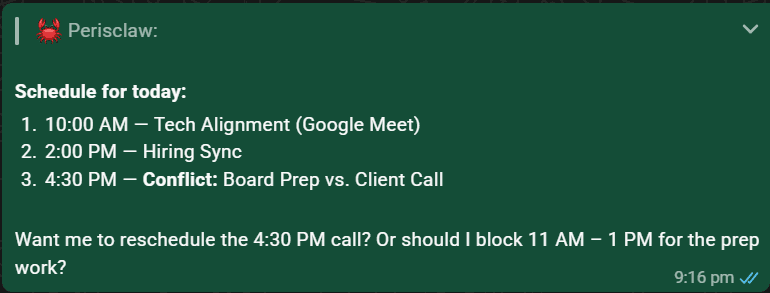
For a single confirmation the day before: "Tomorrow at 10am, send Ana: see you Thursday at 3 for your keratin, please come with dry hair." Each scheduled message goes out from your number at the time you set. Let it run an evening routine too: "Every evening at 8, list tomorrow's appointments from my calendar and anyone who hasn't confirmed." Then confirm the few that matter yourself.
The staff rota group
The staff group is where shifts, leave and cover get sorted, mostly in voice notes. Type /claw summarize who has asked for leave this week and which shifts are still uncovered inside the group and Perisclaw answers there. A native WhatsApp poll settles cover quickly ("Poll the staff group: who can work Sunday 10 to 4?"), and Perisclaw tells you who hasn't voted.
Keep the rota in a Google Sheet, give Perisclaw the link, and update it by voice: "Put Kavya on Sunday morning and mark Rahul on leave Tuesday." Then "who's working Saturday?" gets an answer without opening the sheet. A morning voice note to the team works too: "Every day at 9, send the staff group a voice note with today's bookings count and who's on." You'll see the wording first.
Supplier orders and follow-ups
Colour, products, linen and spa consumables all come from distributors who take orders on WhatsApp. Ask "what did I order from the colour distributor last month?" and Perisclaw finds it in the chat. Then: "Order the same again from Ravi, plus six bottles of developer, and show me the message first."
For a late delivery, hand over the chase: "Ask Ravi for a delivery date every two days until the order arrives, and tell me if it's later than Friday." Before it starts, Perisclaw shows you who it will message, how long it waits and when it stops, and it stops when he replies. Invoices that arrive as PDFs or photos can go straight to Drive ("save this to Salon invoices, November"), and amounts can go in your expenses sheet. It never agrees to a price or commits money without checking with you.
Client preferences it remembers
Good salons remember that a client wants the same stylist, ammonia-free colour, a quiet room and no appointments before 11. Tell Perisclaw once: "Remember Meera prefers Priya, ammonia-free colour, and never books before 11." It keeps that against her, along with what it picks up from your chats, and uses it when it drafts messages to her. Ask "what do we know about Meera?" before she comes in.
Keep health details out of it. A client's skin condition, pregnancy or allergy matters for a treatment, but write it on her client card in your salon system, not in WhatsApp memory. If a chat holds that kind of detail, say "never read" plus the chat name, or lock it with WhatsApp Chat Lock, and Perisclaw can't read, search or quote it.
Offers on your status
To announce a quiet-day offer, post it on your WhatsApp status instead of messaging clients one by one: "Tomorrow at 9am put this on my status: 20% off hair spa on Tuesdays this month." Send a photo first to post it with a caption. All your saved contacts see it unless you name who should.
The same work in Mumbai, Mexico City and Dubai
Mumbai: a two-chair salon in Bandra takes most bookings as WhatsApp messages and voice notes in Hindi and English. Ask "who asked for an appointment today and hasn't had a reply?" during a break, and clear them in one go.
Mexico City: an estética or a nail studio in Roma confirms citas by WhatsApp and orders products from a distribuidora. Ask for the open bookings in the clients' audios, translated if you need it.
Dubai: a spa with therapists from several countries runs its rota in a group full of voice notes. Ask for the leave requests in English, and say whose timezone a supplier call is in.
When a booking tool or the Business API is better
Perisclaw is an assistant for your own WhatsApp. It isn't salon software, a booking page or a reminder system.
Need | Better fit |
|---|---|
Clients booking themselves online, 24/7 | A booking tool such as Fresha |
Automatic reminders for every appointment | A booking tool with WhatsApp or SMS reminders, or a Business API reminder system paid per message |
Client cards, treatment notes, payments and stock | Salon management software |
An away message, a services catalog and saved answers | The free WhatsApp Business app |
Your own chats: reschedules, staff group, suppliers, client preferences | Perisclaw |
A simple rule: if you send more than a few dozen reminders a day, use a booking tool or a Business API system for them, and use Perisclaw for everything else on your phone. A studio with several stylists can give each one their own assistant on their own number with a team plan (being rolled out to accounts), on one bill, and nobody, including the owner, can read another person's chats.
A word on bulk messages and your number
Don't use Perisclaw to message every client about an offer. Sending the same message to many chats is what WhatsApp's spam rules target, so Perisclaw stops after 15 chats in one go, tells you who has and hasn't been messaged, and asks before continuing. Adding people to a group is capped at 10 at a time and 20 in one go; beyond that it offers the invite link so people join by choice.
Perisclaw connects as a linked device, which WhatsApp didn't build for outside tools, and WhatsApp's help centre warns that linking unofficial apps can lead to a ban. Nobody outside WhatsApp can promise zero risk, so we don't. If you're deciding between the Business app and the API, read WhatsApp Business app vs Business API.
FAQ
What is the best AI assistant for salon owners who use WhatsApp?
If clients already message your number, pick an assistant that works on that number. Perisclaw does, and handles reschedules, the staff group, supplier orders and client preferences. For online self-booking and automatic reminders at volume, a booking tool such as Fresha fits better.
Can it book appointments for my salon automatically?
It can check your Google or Outlook calendar, book or move an appointment when you ask, and draft the confirmation for your approval. It doesn't give clients a booking page; use a booking tool for that.
Can it send appointment reminders to all my clients?
Not at volume. It stops after 15 chats in one go and asks before continuing. For a reminder before every appointment, use a booking tool or a Business API reminder system.
Will it reply to clients without me?
Not by default. It drafts each reply in your self-chat and sends when you approve. If you set up an Automation, such as answering price questions in one chat, you see who it will message before it starts.
Can it remember what each client likes?
Yes. Tell it a client's stylist, products and timing preferences and it uses them later. Keep health details in your salon software, not in WhatsApp.
Keep your hands on the client, not the phone. Start your 7-day free trial →
Try Perisclaw free
Your personal AI assistant on WhatsApp. It reads the chats you allow and gets things done for you. 7-day free trial, no card needed.
Start for free