
How to summarize WhatsApp groups and voice notes with AI

You come out of a three-hour meeting to 400 messages in the vendor group, a two-minute voice note from your accountant, and a client group where someone has asked you something twice. You don't have time to read it all, and you can't play voice notes out loud in a waiting room. All you want is the short version: what was decided, what's still open, and what needs you.
You can summarize WhatsApp groups and voice notes with AI in four ways. WhatsApp's own tools can transcribe voice notes in some languages and, where available, summarise one chat's unread messages. You can export a chat and upload it to ChatGPT or Claude for a one-off summary. Or you can connect your WhatsApp to an assistant like Perisclaw, which summarises any group or voice note on request, in most widely used languages, and sends you a daily catch-up across all your chats.
The four options at a glance
Option | Best for | Voice notes | Stays up to date | Cost |
|---|---|---|---|---|
WhatsApp's built-in tools | Reading one voice note or one chat quickly | Transcripts in a few languages | Yes | Free |
Export a chat to ChatGPT or Claude | Analysing one conversation once | Only by uploading each audio file (paid ChatGPT) | No, it's a snapshot | Free or paid AI plan |
ChatGPT or Claude with Perisclaw connected | Asking about any chat from the AI you already use | Use Perisclaw in WhatsApp for these | Yes | Perisclaw subscription |
Perisclaw in WhatsApp | Daily catch-ups, group digests, voice notes in your language | Yes, sent or received | Yes | Perisclaw subscription |
Option 1: WhatsApp's own tools
Voice message transcripts turn voice notes you receive into text, on your phone, so nobody else sees them. To turn them on, go to Settings, Chats, Voice message transcripts, and choose the language most of your voice notes are in. Then press and hold a voice note and tap Transcribe.
The catch is language. The list of supported languages is short, differs between Android and iPhone, and is still changing as of November 2026, so check WhatsApp's help center for your phone before you rely on it. You also pick one transcript language at a time, which doesn't suit a voice note that switches between Hindi and English, or a week where your clients write in three languages. And you get a transcript, not a summary.
Message Summaries use Meta AI to give you a short private summary of the unread messages in one chat. It's free and off by default, and it's rolling out country by country (it started in the US, in English), so you may not have it yet. It covers only what's unread in the chat you've opened, so it won't tell you which of your 30 groups to open first.
Option 2: Export a chat and upload it to ChatGPT or Claude
This works today, for free, and it's a good choice for a single deep dive, like reviewing a month of a project group before a meeting.
Open the group in WhatsApp.
On iPhone, tap the group name, then Export chat. On Android, tap the three dots, then More, then Export chat.
Choose Without media to get a plain text file. On iPhone it arrives as a ZIP; open it to get the .txt file.
Upload the .txt file to ChatGPT or Claude and ask for what you need:
"This is a WhatsApp group export. Summarise it in three parts: decisions made, open questions with who asked them, and anything addressed to me (I'm Priya). Quote the date for each."
Before you rely on it, know the limits. It's a snapshot, so it's out of date as soon as someone sends a new message, and you can't reply from it. Voice notes show up in the text only as attachments, so whatever was said in them is missing; on a paid ChatGPT plan you can upload the audio files one by one for transcription, but the free plan doesn't take audio. Free ChatGPT accounts can only upload a few files a day. And you're sending the whole conversation, including other people's messages, to that AI provider.
Option 3: Ask ChatGPT or Claude about your live chats
If you already work in ChatGPT or Claude, you can skip the export and let it read your WhatsApp directly. With Perisclaw connected, your AI can search and summarise any chat you allow, as it is right now.
ChatGPT: add the Perisclaw app in ChatGPT, sign in, and choose Read only.
Claude: go to Customize, Connectors, Add custom connector, and paste
https://api.perisclaw.com/mcp/plugin. Our guide to connecting WhatsApp to Claude has the details.
Then ask in plain words:
"Summarise everything I missed in my work groups today."
"Summarise the vendor group since Monday and list anything I need to decide."
"What did the builder's group agree about the handover date? Show me who said it."
Read only is enough for summaries; your AI can't send anything. Catching up this way doesn't mark messages as read, so nobody sees blue ticks. The full setup is in our guide to connecting WhatsApp to ChatGPT.
Option 4: Summarize WhatsApp groups and voice notes with Perisclaw
Perisclaw runs on your own WhatsApp number, so you can ask for a summary without leaving WhatsApp.
Summarise one group: in your self-chat, ask "Summarise the last 200 messages in the launch group. Separate decisions, open questions, and anything waiting on me." You can also type /claw summarise the decisions in this chat inside the group itself, but the answer is posted in that group for everyone to see, so use your self-chat when the summary is just for you.
Summarise a set of chats: label your client chats once, then "catch me up on clients" covers all of them in one answer.
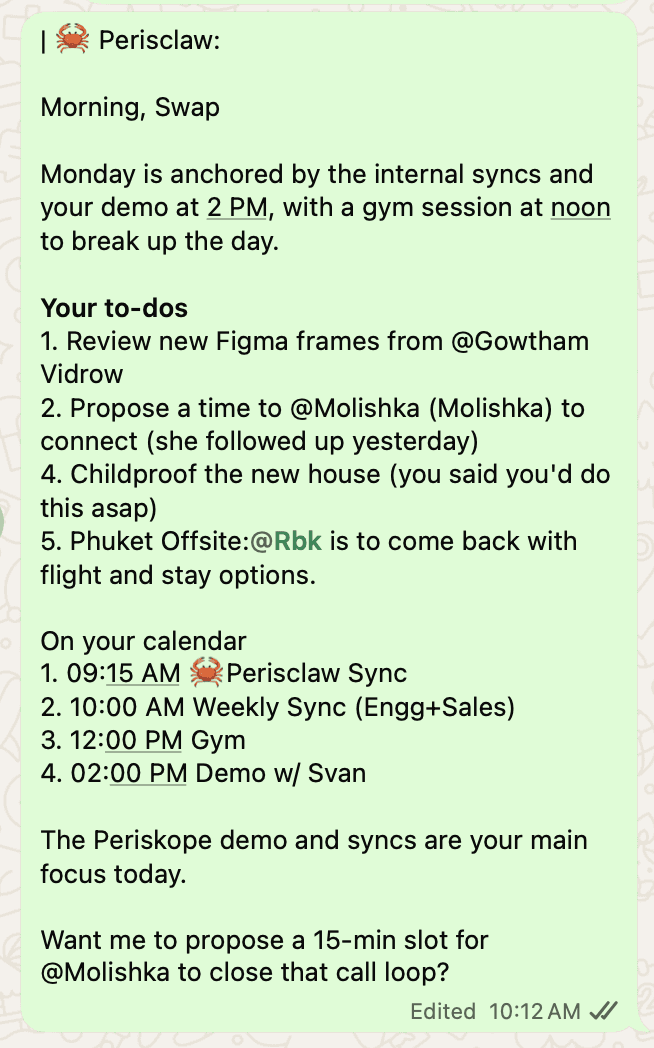
Get it every day: "Every evening at 7, summarise the cohort group: unanswered questions, decisions made, and anything that needs me personally." It arrives in your self-chat without you asking again. Your morning briefing already covers what needs your reply across all your chats.
Voice notes you receive: ask "What did Priya say in that voice note?" for the gist, or "Transcribe the last audio in the vendors group and translate it to English" for the full text. Perisclaw understands most widely used languages, including Hindi, Spanish, Portuguese and Indonesian, and there's no language setting to choose first. If your voice notes mix Hindi and English mid-sentence, try your messiest one during the free trial and see what comes back.
Voice notes you send: talk instead of typing. "Remind me to call the bank Friday and tell Raj the delivery moved to Monday" is handled like a typed message.
Find the detail later: a summary tells you what happened; search finds the exact message. Ask "find where we agreed the launch date" and Perisclaw quotes it with the date and chat.
Prompts that give useful summaries
A vague "summarise this" gives you a vague paragraph. These work better, in any of the AI options above:
"Decisions, open questions, and anything waiting on me, as three short lists."
"Only the messages that mention me or ask me something."
"What changed since my last message in this group?"
"Flag anything that sounds like a customer complaint or a payment issue."
"Give me the gist of every voice note in this chat today, one line each."
Which option should you use?
WhatsApp's built-in tools if you mainly need to read the odd voice note in a language your phone supports, or skim one busy chat.
Export to ChatGPT or Claude for a one-off review of a single conversation, when you don't mind the copy-paste.
ChatGPT or Claude with Perisclaw if you live in those tools and want to ask about any chat, any time.
Perisclaw in WhatsApp if you're in many groups, get voice notes in more than one language, and want a daily catch-up instead of a pile of unread badges.
FAQ
Can I ask ChatGPT to summarize my WhatsApp group chats?
Yes. Either export the chat and upload the text file, which is free but a one-time snapshot, or connect WhatsApp to ChatGPT with the Perisclaw app so it can read your live chats whenever you ask.
Is there an AI that understands Hindi voice notes on WhatsApp?
Perisclaw understands Hindi voice notes, can transcribe them, and can translate them into English, with no language setting to pick. WhatsApp's own transcripts are adding languages, but you choose one transcript language at a time, which doesn't suit voice notes that mix Hindi and English.
Is there an AI app to summarise WhatsApp business chats in Indonesia?
If you're searching "aplikasi AI untuk merangkum chat WhatsApp bisnis", Perisclaw works on WhatsApp Business app numbers in Indonesia and understands Indonesian messages and voice notes, so you can ask for a summary of a busy customer chat in your self-chat.
Will people know I used AI to summarise their messages?
No. Summaries you ask for in your self-chat, or from ChatGPT and Claude, are visible only to you. A /claw request typed inside a group is answered in that group, so everyone sees it.
Is it safe to let an AI read my WhatsApp groups?
With Perisclaw, you choose which chats it can read, block any chat you want kept out, and your data is never used to train AI models. See Privacy & security.
Get the short version of every busy group, every day. Start your 7-day free trial →
Try Perisclaw free
Your personal AI assistant on WhatsApp. It reads the chats you allow and gets things done for you. 7-day free trial, no card needed.
Start for free

