
WhatsApp AI assistant for marketing agencies: client groups, approvals and feedback on your own number

It's Thursday night and the client's founder has replied to Monday's carousel in the group with "looks good, but can we change the hook?", the brand manager has sent a different change as a voice note, and your designer is asking in another group which version to export. Meanwhile two other clients haven't approved next week's posts, and last month's invoice is still "with accounts". Your agency runs on 30 WhatsApp groups, and the account manager's memory is the only thing holding them together.
A WhatsApp AI assistant for marketing agencies should work inside those client groups on the number you already use, not as a separate bot your clients have to learn. Perisclaw does that: it connects to your own WhatsApp or WhatsApp Business app as a linked device, summarises what each client group decided, keeps track of which approvals and feedback you're still waiting on, chases them on a schedule you set, files assets and invoices to Drive, and turns your voice notes into tasks. It drafts messages to clients in your self-chat and sends them after you approve.
What a WhatsApp AI assistant for marketing agencies does
Client group catch-ups
After a day of shoots or calls, type /claw summarize the feedback on this week's posts, what's approved and what's still open inside the group and Perisclaw answers there, labelled as Perisclaw. If you'd rather keep that private, ask in your self-chat instead: "What did the Nova Foods group decide today? Separate approvals, changes and questions for us."
It reads voice notes too, so "what did Ritika ask for in that two-minute audio?" gets you the change request in text before you brief the designer.
Approvals that don't stall
Perisclaw reads the chats you allow and sorts the open work: things clients asked you for, things you promised ("final cut by Friday"), and things you're waiting on (the approval on next week's calendar). Each chat gets a Needs You, Waiting or Later label in your chat list, and the morning briefing lists the ones that matter most.
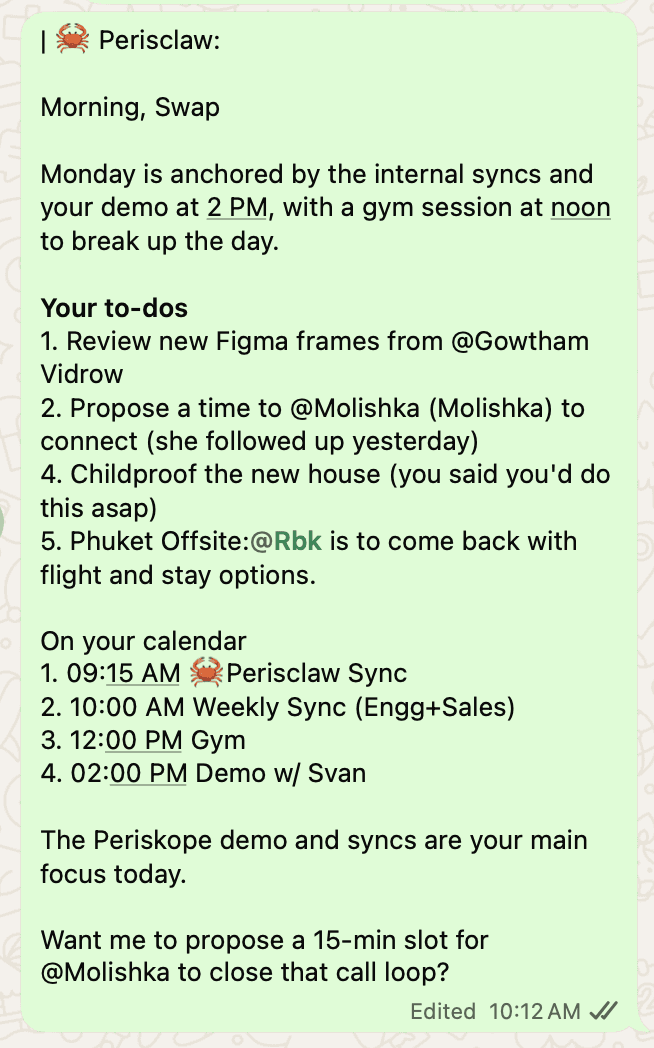
For a client who never approves on time, set up a chase once:
"Every Tuesday at 11, if the Nova Foods group hasn't approved next week's posts, ask Ritika for approval. If there's still no answer by Wednesday 5pm, tell me."
Before it starts, Perisclaw shows you who it will message, how long it waits and when it stops, and it stops as soon as the client replies. Approvals often come as a thumbs-up or "go ahead" buried in a thread, so you can also ask: "Which posts in the Nova Foods group got an explicit approval this week, and from whom?" It quotes the messages so you can check.
Content calendar from the chat
If your calendar lives in Google Sheets, connect it and give Perisclaw the link. Then "mark the 14th reel as approved in the Nova calendar" or "which posts for next week still have no caption?" works from WhatsApp. Asana, Notion, Slack and Canva are in Perisclaw's app catalog as of November 2026, so if your team plans in Asana, "add 'reshoot product flatlay' to the Nova project for Friday" can come straight from a client message.
Feedback rounds with your own team
Freelancers and editors live on WhatsApp too. Hand over the back-and-forth as a goal: "Get the revised logo files from Arjun by tomorrow 6pm. Follow up if he goes quiet and tell me if he says it'll slip." Perisclaw keeps at it until the files arrive or it needs you, and "save these to the Drive folder Nova, November assets" puts them where your team will look.
Invoices and retainer payments
Schedule the polite version of the payment chase once: "On the 3rd of every month at 10, remind the accounts contact at Nova that the retainer invoice is due on the 7th." For a late one, set up a chase that steps up gently and stops when they reply. Invoice PDFs and payment screenshots can go straight to Drive and a row in your receivables sheet. If you bill through Stripe or PayPal, both are in the app catalog too. For more on wording and timing, read how to schedule WhatsApp messages and payment reminders.
Team handoffs
When an account manager goes on leave, the handover is usually a scroll through months of chat. Instead, ask: "Write a handover for the Nova account: open deliverables, pending approvals, unpaid invoices, and anything I promised in the last two weeks, with the message each one came from." Perisclaw searches your allowed chats, including PDFs and voice notes, and shows where each point came from.
On a team plan, which is being rolled out to accounts, each person gets their own assistant on their own number, on one bill, and nobody, including the owner, can read anyone else's chats. The outgoing person writes the handover from their own assistant and shares it.
The same workflows in India, the UAE and Latin America
India: a Bengaluru or Mumbai agency often runs each D2C client through a group with the founder, the marketing lead and a performance freelancer, in English and Hindi. Ask "which clients haven't approved next week's calendar?" every Friday and approve the chase drafts in one go.
UAE: in Dubai, clients and freelancers are often in different timezones and languages. Ask Perisclaw to transcribe a client's Arabic voice note and translate it to English before you brief the team, and say whose timezone a review call is in so Perisclaw confirms it before booking.
Brazil and Mexico: agencies in São Paulo or Mexico City get approvals as áudios and feedback as screenshots. Ask for "the changes the client asked for in the audios today, as a numbered list" and send it to the designer once you've checked it.
Where project tools and the Business API fit better
Perisclaw is an assistant for one person's WhatsApp. It isn't a project management tool or a marketing platform.
Need | Best fit |
|---|---|
Task boards, timelines and workload across the whole team | A project tool such as Asana, Notion, ClickUp or Monday |
Running WhatsApp campaigns to a client's customers | A WhatsApp Business API platform, paid per template message |
Saved replies and an away message on your business number | The free WhatsApp Business app |
Keeping up with your own client groups, approvals, feedback and invoices | Perisclaw |
Many agencies use both: the project tool is the record, and Perisclaw handles WhatsApp.
A word on bulk messages and your number
Don't use Perisclaw to send a client's offer to their customer list, or your agency newsletter to every contact you have. WhatsApp's Terms of Service prohibit bulk messaging and auto-messaging, so Perisclaw stops after 15 chats in one go, tells you who has and hasn't been messaged, and asks before continuing. Group adds are capped at 10 people at a time, and beyond that it offers the invite link.
Perisclaw connects as a linked device, which WhatsApp didn't build for outside tools, and WhatsApp's help centre warns that linking unofficial apps can lead to a ban. Perisclaw is built for normal one-to-one and group work like the workflows above. Nobody outside WhatsApp can promise zero risk, so we don't.
Prompts to try this week
"Which clients are waiting on a reply from me, and since when?"
"Summarise everything the Nova group asked for this month that we haven't delivered."
"Every Friday at 4, list approvals I'm still waiting on, by client."
"Draft a reply to the Nova group confirming the reel goes live Monday. Show me first."
"Never read the Family group." (Blocked chats are never read, searched or quoted.)
FAQ
What is the best AI assistant for a marketing agency that works with clients on WhatsApp?
If your clients already message your number and run feedback in WhatsApp groups, pick an assistant that works on that number instead of a new bot. Perisclaw does, and handles group summaries, approval chases, invoice reminders and handovers. For team task boards or customer campaigns, a project tool or Business API platform fits better.
Will it post in client groups without asking me?
No, not by default. Replies you ask for are drafted in your self-chat and sent when you approve, and they go out as you, with no assistant label. /claw answers in the group, labelled, because you called it there. Chases you set up send as planned, after you've seen who they'll message and when they stop.
Can my whole agency use it?
Yes, with a team plan, which is being rolled out to accounts: each person keeps their own number and private assistant on one bill, and nobody, including the owner, can read another person's chats.
Can it message all of a client's customers on WhatsApp?
No. It stops after 15 chats in one go, because broadcast-style sending can get a real number flagged. Use a WhatsApp Business API platform for campaigns.
Keep every client group, approval and invoice moving from your own WhatsApp. Start your 7-day free trial →
Try Perisclaw free
Your personal AI assistant on WhatsApp. It reads the chats you allow and gets things done for you. 7-day free trial, no card needed.
Start for free
