WhatsApp AI assistant for lawyers: client updates, hearings and documents, with sensitive matters kept out

You walk out of court at 4 and WhatsApp has 30 unread chats: two clients asking "any update?", your junior forwarding the next date, a client's son sending a blurry photo of the property papers, and opposing counsel's clerk asking to move Thursday's meeting. The real work is in the files, but the day gets eaten by chasing documents and answering the same status question five times. And the one client you forgot to call back is the one who complains.
A WhatsApp AI assistant for lawyers is most useful for the admin around a matter, not the legal work itself. Perisclaw runs on your own WhatsApp or WhatsApp Business app number as a linked device and helps with client status updates, hearing and meeting dates on your calendar, document requests, and filing what clients send into Google Drive. It is not a case-management system, it makes no claims about privilege, bar rules or legal-sector compliance, and you can block any chat about a sensitive matter so it can't read it at all.
Read this first: confidentiality and privilege
It is not a case-management system: keep your matter records, conflict checks, deadlines of record, time entries and billing in your practice software, such as Clio, or your firm's own system. Perisclaw is an assistant for your WhatsApp, not the file of record, and it can't tell you whether you have a conflict.
It makes no legal-compliance claims: Perisclaw's docs don't describe attorney-client privilege protections, legal-sector certifications or a bar-approved setup. Its security certification is ISO 27001, a general information-security standard. Your data stays in your own isolated environment, is encrypted, and is never used to train AI models.
Your professional rules still decide: in the US, ABA Formal Opinion 512 (July 2024) says a client's informed consent is needed before a lawyer puts confidential information into a self-learning AI tool, and a boilerplate line in the engagement letter doesn't count. We can't tell you whether letting an outside tool process a client conversation affects privilege, confidentiality or your duties where you practise, and nothing on this page is legal advice, so check your own bar's rules and your firm's policy before you connect a number clients use.
How to keep sensitive matters out of its reach
By default Perisclaw can read your chats to do its work, so set these up before you rely on it (the full list is in the permissions guide):
Block a chat: say "never read" plus the chat name in your self-chat, or block it under Blocked chats in Settings → Permissions. Perisclaw then can't read, search, summarise or quote that chat.
Use WhatsApp Chat Lock: lock a chat in WhatsApp and Perisclaw treats it as blocked automatically. While it's locked, the assistant can't read it, search it, write to it or use it in background work.
Hide one message with /ignore: add
/ignoreto a message you send and Perisclaw won't act on it or return it in later searches.Keep sending on Ask me first: this is the default for Message other chats in Settings → Permissions, so every message you ask it to send to a client is drafted in your self-chat and waits for your approval. Only chases and routines you set up yourself send without a draft, and you see who they'll message before they start.
Add hard rules: rules under Settings → Permissions are checked before every action, for example "never forward a document from one client's chat to anyone else" or "never send anything to opposing counsel without asking me".
A workable split: lock or block chats where clients discuss facts, strategy or settlement, and let Perisclaw work on logistics chats and your self-chat. Don't paste privileged documents, ID numbers, bank details or passwords into your self-chat to get help with them. In someone else's chat it treats them as an outsider and won't reveal your other conversations, calendar or files.
What a WhatsApp AI assistant for lawyers handles well
Client status updates
Ask at the end of the day: "Which clients asked me for an update this week and haven't had a reply?" Perisclaw lists them, and you can ask it to draft each reply. Drafts wait in your self-chat and go out, as you, only when you approve. For a regular rhythm:
"Every Friday at 5, list the clients with a hearing or meeting next week and draft a two-line update for each. Show me before anything goes out."
For how it spots promises like "I'll call you after the hearing", read how Perisclaw tracks WhatsApp follow-ups.
Hearing and meeting dates
Connect Google Calendar or Outlook and tell Perisclaw what to add: "Next date in the Mehta matter is 14 November, court 12, add it and remind me the evening before to pull the file." To tell the client, schedule a message: "On 13 November at 6pm, send Mr Mehta: your hearing is tomorrow at 10:30, please be at court by 10."
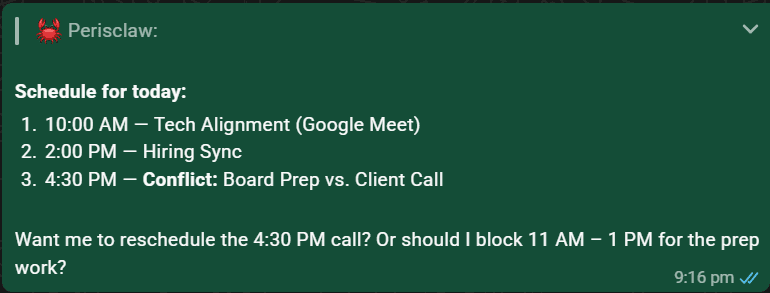
For a conference with the client and senior counsel, hand over the back-and-forth: "Find a slot next week when Mr Mehta and Advocate Rao are both free for 45 minutes and book it." Perisclaw coordinates until the time is set.
In India, the Supreme Court has sent advocates-on-record automated WhatsApp messages about e-filing, objections, cause lists and orders since April 2024. Those messages sit in your WhatsApp like any other, so you can point Perisclaw at one and ask "which of the matters on my calendar are in this list?" Check the result against the list itself before you rely on it.
Document requests
Chasing a signed vakalatnama, an engagement letter or a copy of the sale deed is a goal, not a single reminder. Hand it over once: "Get the signed vakalatnama and the sale deed copy from Mrs Kapoor by Thursday. Follow up when useful and tell me if she has questions." Perisclaw follows up and brings you anything it can't answer. It never agrees to fees, terms or anything binding without checking with you first. For identity documents, bank statements and anything privileged, point clients to your firm's portal or secure upload instead of WhatsApp.
Filing to Drive
When the papers arrive as photos and PDFs, file them without downloading anything: "Save these to the Drive folder Kapoor, title documents, and rename them by date." In Drive, it only sees the folders and files it created for you; the rest of your Drive stays invisible to it. Check your firm's policy on where client documents may be stored before you file them to a personal Drive.
The same work in Delhi, Mexico City and Dubai
Delhi: clients write and send voice notes in Hindi and English, often mixed, and juniors share next dates in a chamber group. Type /claw list every next date mentioned here this week in the group, then ask Perisclaw to add them to your calendar.
Mexico City or Bogotá: as an abogado in a small despacho, half your clients send audios. Ask what documents a client still owes you, or what the notary's office confirmed.
Dubai: clients are often abroad, so say whose timezone a meeting time is in (Perisclaw confirms ambiguous ones before booking), and chase signed and attested documents as one goal instead of five reminders.
Where other tools fit better
Need | Better fit |
|---|---|
Matter records, deadlines of record, time and billing | Practice management software such as Clio, or your firm's system |
Secure document exchange with clients | Your practice software's client portal or e-signature tool |
An away message, greeting and saved answers | The free WhatsApp Business app |
Legal research and opinions | Your own judgement and dedicated legal research tools |
Your own admin: updates, dates, document chases, filing | Perisclaw |
A word on bulk messages and ban risk
Don't use Perisclaw to message every client about a change of office. Sending the same message to many chats is what WhatsApp's spam rules target, so it stops after 15 chats in one go, tells you who has and hasn't been messaged, and asks before continuing. Adding people to a group is capped at 10 at a time; past that, it offers the group's invite link.
Perisclaw connects as a linked device, which WhatsApp didn't build for outside tools, and WhatsApp's help centre warns that linking unofficial apps can lead to a ban. Perisclaw is built for normal one-to-one work like the workflows above. Nobody outside WhatsApp can promise zero risk, so we don't. For more on what it stores and who can see it, read how Perisclaw keeps your WhatsApp private.
FAQ
Is there a WhatsApp AI assistant for lawyers?
Yes. Perisclaw works on the number your clients already message and helps with the admin around your matters: status updates, hearing and meeting dates, document chases and Drive filing. It isn't a case-management system, and you should block or lock chats that discuss facts or strategy.
Is it safe for confidential or privileged client communications?
Perisclaw makes no claims about privilege or legal-sector compliance. It has ISO 27001, encryption, isolated environments and no training on customer data, which is general security. Whether using it fits your duties is for your professional rules and your firm's policy to decide, so check those first, and keep chats about facts, strategy or settlement blocked or locked.
Can I stop it from reading certain client chats?
Yes. Say "never read" plus the chat name, block it in Settings → Permissions, or lock it with WhatsApp Chat Lock. A blocked or locked chat can't be read, searched, summarised or quoted.
Will it reply to clients on its own?
No, not by default. It drafts each reply in your self-chat and sends when you approve. The exceptions are ones you set up yourself, such as a document chase, and you see who it will message and when it stops before it starts.
Does it give legal advice?
No. It can draft a status update or summarise a chat, but it isn't a legal research tool and it doesn't replace your judgement. Check anything it drafts before it goes to a client.
Spend your evenings on the brief, not the status questions. Start your 7-day free trial →
Try Perisclaw free
Your personal AI assistant on WhatsApp. It reads the chats you allow and gets things done for you. 7-day free trial, no card needed.
Start for free