
Never miss a follow-up: AI that tracks what you promised on WhatsApp

You type "I'll send the revised quote by Friday" into a client group, and the conversation moves on. By Thursday it's buried under 200 new messages, and there's no reminder attached to it anywhere, because WhatsApp doesn't know it was a promise. The same goes for the vendor who said "samples by Monday" and the teammate who said they'd check the numbers. Remembering all of it is your job, and on a busy week something slips.
Yes, there is an AI that tracks WhatsApp follow-ups for you. Perisclaw runs on your own WhatsApp number, reads the chats you allow, and keeps a list of what you promised, who's waiting on your reply, and what other people owe you. It closes items on its own when the work is done, reminds you about what's still open, and can follow up with people for you until they reply.
How Perisclaw finds promises in your chats
When a conversation goes quiet, Perisclaw reads it and picks out the open work. It reads for meaning, not keywords, so "kal tak bhej dunga", "will revert by EOD" and "let me check and come back to you" all count. It tracks three kinds of follow-ups:
You owe the next step: you promised to send, share, decide, call or do something.
Someone needs your reply: they asked you something clearly, and the conversation still needs an answer from you.
You're waiting on someone: you asked for something, or they promised it, and it hasn't arrived.
Casual chat, thank-yous, FYIs and broadcasts don't become tasks. You can also add your own: "keep the visa renewal on my list", or forward a message and say "follow up on this".
How it closes them
This is the part that makes the list trustworthy. When later messages show the work is done (you sent the quote, the vendor sent the samples), Perisclaw closes the task by itself. A task that has been quiet for a week with nothing left for you to do also closes, but payments, deliverables, anything you snoozed or told it to keep, and tasks you added yourself stay open.
You can always correct it in plain words: "I'm waiting on Daniel for the figures, not the other way round", or "mark the quote task done". If it keeps tracking the wrong things, give it a rule once: "stop tracking pings from the family group" or "always flag anything about a payment".
How it reminds you
You don't have to remember to check a separate app.
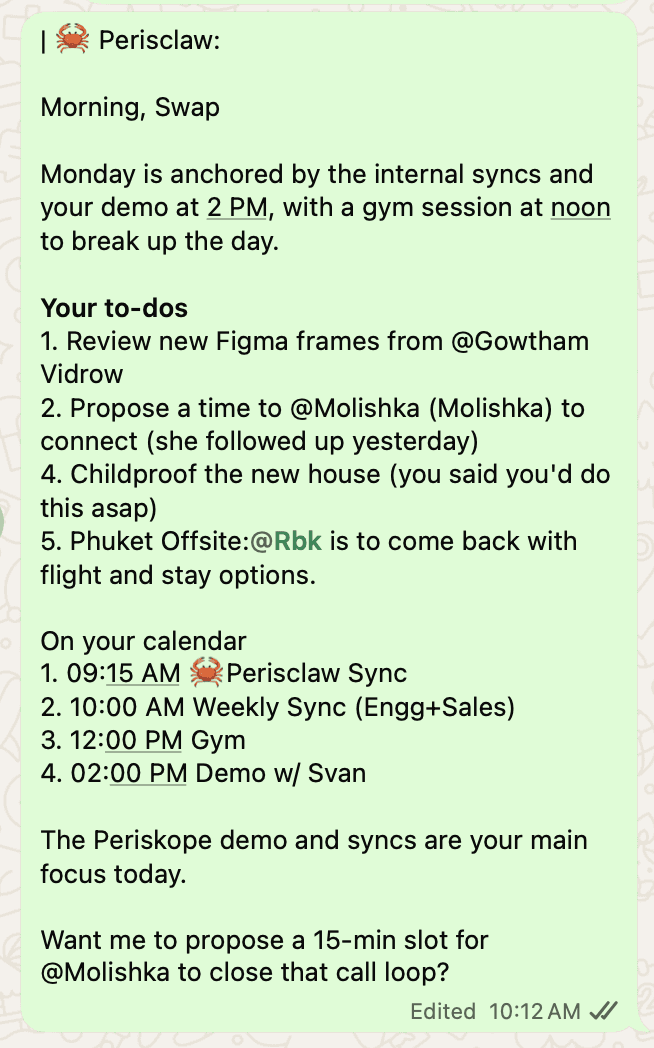
Morning briefing: each morning your self-chat gets the most important open items, what people are waiting on, and your meetings if your calendar is connected. Reply "2 is done" to close the second item.
Labels in your chat list: Perisclaw labels each chat Needs You, Waiting or Later as things change, in WhatsApp and in Gmail, so your chat list shows where every conversation stands. You can switch this off in Settings.
When you ask: "What have I promised this week, who's waiting on me, and what am I still waiting on?"
In the web app: the Today page lists every open task with the chat it came from and a reply already drafted.
"Chase them until they reply"
Reminding you is half the job; the other half is chasing people who've gone quiet. Describe the chase once in your self-chat and Perisclaw runs it from your number:
"Every Friday at 4, ask Ravi for the weekly numbers. If he hasn't replied by Monday morning, ask again. If he still hasn't by Tuesday, tell me."
Before it goes live, Perisclaw shows you who it will message, how long it waits, and when it stops. Follow-ups stop when the person replies, and a chase can't run forever unless you ask for an open-ended one.
For bigger outcomes, hand it a Mission: "Get the signed agreement from the vendor by Friday. Follow up when useful, and tell me if they push back on the terms." Perisclaw works out the steps, waits for replies, and comes back to you only if a decision goes beyond what you allowed.
For your own to-dos, a plain reminder works: "remind me Tuesday at 10 to send the invoice", or "nudge me every 15 minutes from 9pm until I say I've called Mum". The reminder comes back with the reason, so you can act on it straight away.

Prompts to try in your first week
"What did I promise people this week that's still open?"
"Who has been waiting on my reply for more than two days?"
"If Kabir doesn't send the revised quote by Friday, nudge him politely."
"Chase the three unpaid invoices from last month until they're paid. Check with me before the second reminder."
"Snooze the venue follow-up until Tuesday."
Other ways to track WhatsApp follow-ups
You don't need an AI for all of this, and for some people these are enough.
WhatsApp's own reminders: long-press a message, tap More, then Remind Me, and WhatsApp brings it back after 2, 8 or 24 hours, or at a time you pick. It's free and private. It works only on a message you've already spotted, though, and it can't tell when the work is done.
Starred messages: long-press and tap Star to save a message to a list only you can see. Good for a handful of things; it turns into a second inbox once you have 40.
A to-do or reminders app: copy each promise into Todoist, Apple Reminders or Google Tasks. Reliable if you're disciplined about it, but you're still the one noticing every promise and typing it in.
A CRM: if you follow up with dozens of leads a week, a CRM gives you pipelines and reports. Most don't read your personal WhatsApp chats, so it means logging every conversation by hand.
Meta AI: WhatsApp's built-in AI only sees messages you send it or @mention it in, so it can't notice promises in your other chats. See Meta AI in WhatsApp vs Perisclaw for the details.
Use Perisclaw if promises come up across many chats every day and you'd rather not be the one noticing them. For how founders build a whole workday around this, read how founders use a WhatsApp AI executive assistant.
FAQ
Is there an AI that can read my WhatsApp messages and remind me to reply?
Yes. Perisclaw reads the chats you allow on your own number, notices which ones still need your reply, and brings them back in your morning briefing and as Needs You labels in your chat list.
Will it message people without asking me?
Not unless you set it up to. By default, a message it writes for you appears in your self-chat first and goes out when you say "send". Follow-ups you set up in advance send as planned, after you've seen the plan.
Does it track what other people promised me?
Yes. "Waiting on someone" is one of the three kinds of tasks it tracks, and it closes the task when the thing arrives.
Can I choose which chats it reads?
Yes. Block any chat and Perisclaw can't read, search or quote it. Your data is never used to train AI models.
Does it work with the WhatsApp Business app?
Yes. It works with regular WhatsApp and the WhatsApp Business app, on the number you already use, with no Business API.
Let Perisclaw remember what you promised. Start your 7-day free trial →
Try Perisclaw free
Your personal AI assistant on WhatsApp. It reads the chats you allow and gets things done for you. 7-day free trial, no card needed.
Start for free

