
WhatsApp AI assistant for consultants and freelancers: client chats, scope, invoices and weekly updates

You have nine clients and nine WhatsApp chats, plus a group for two of them. One client's "quick tweak" on Tuesday has quietly become a new deliverable, an invoice is three weeks overdue and you haven't chased it because it feels awkward, and it's Friday evening and you still owe four people a weekly update. None of this is the work you're paid for, but it decides whether you get paid.
A WhatsApp AI assistant for consultants and freelancers should work on the number your clients already message, so nothing moves to a new app. Perisclaw does that: it connects to your own WhatsApp or WhatsApp Business app as a linked device, tracks who is waiting on you and what you're waiting on, finds what was agreed when scope starts to drift, chases unpaid invoices, drafts weekly client updates and books calls on your calendar. It drafts messages in your self-chat and sends them after you approve.
What a WhatsApp AI assistant does for consultants and freelancers
Many client chats, one picture
Perisclaw reads the chats you allow and picks out the open work: things you promised ("I'll send the revised deck tomorrow"), questions a client is waiting on, and things you're waiting for (their feedback, their brand assets, their payment). Each chat gets a Needs You, Waiting or Later label in your chat list, and your morning briefing leads with the items that matter most.
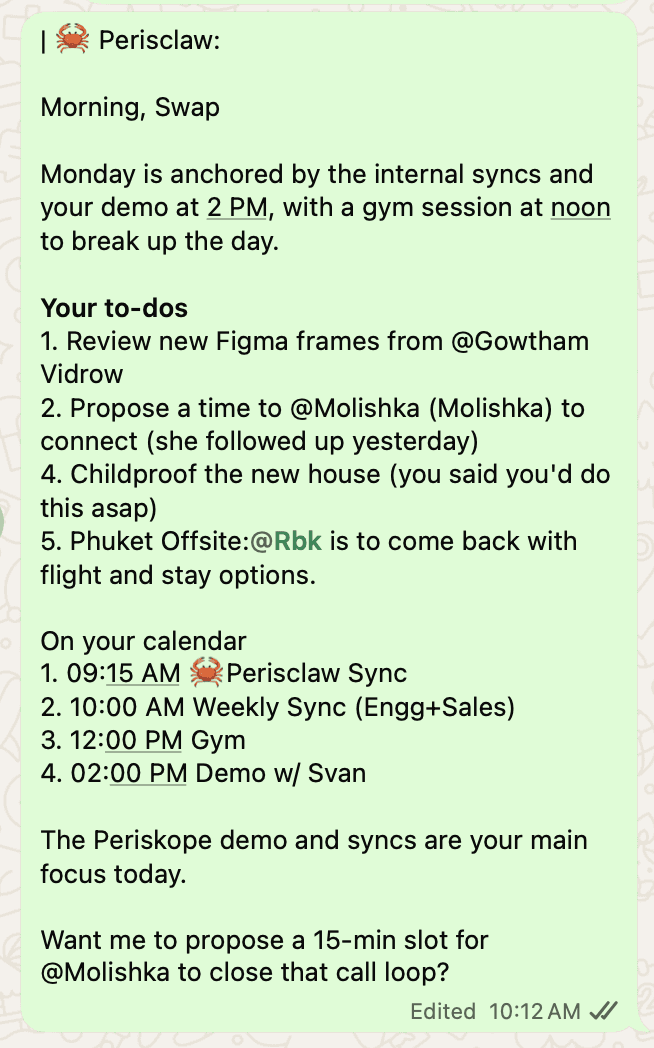
To work by client, ask it to label your chats: "Propose a label for each client and show me every chat under each before you apply anything." Then "catch me up on Acme" summarises every chat with that label. For the details of how it finds promises, read how Perisclaw tracks WhatsApp follow-ups.
Scope creep, caught early
Scope drifts one message at a time, and by the time you notice, nobody remembers what was agreed. When it starts, ask: "What did Acme and I agree was in phase one? Check the chat and the proposal PDF they sent back, and show me the messages." Perisclaw searches your allowed chats, including PDFs and voice notes, and shows where each answer came from.
You can also have it watch for drift: "In my client chats, tell me when someone asks for work that sounds outside what we agreed." That runs in the background and tells you in your self-chat; it doesn't reply to the client. You then decide how to answer, and can ask it to draft a friendly change-request message for you to approve.
Proposals and invoices
Perisclaw doesn't replace your invoicing tool, but it keeps the paperwork around it moving. Signed proposals and purchase orders that arrive in WhatsApp go to Drive with one line ("save this to Clients, Acme, contracts"). Keep a simple invoice tracker in Google Sheets and update it from chat: "add invoice 0142, Acme, 2,400 dollars, due 15 November" or "mark 0139 as paid". Then ask "which invoices are overdue?" without opening the sheet. Stripe and PayPal are also in the connector catalog if you bill through them.
For the awkward part, set up the chase once:
"If Acme hasn't paid invoice 0142 by the 15th, send a polite reminder. Ask again a week later, and tell me if there's still nothing after that."
Before it starts, Perisclaw shows you who it will message, how long it waits and when it stops, and it stops when they reply. It never agrees to a discount, a new price or a binding promise without checking with you first.
Follow-ups with prospects
A proposal sent on Monday and never answered is the most common leak. "Every Monday, list the prospects I sent a proposal to who haven't replied in a week, and draft a short check-in for each" gives you a list and drafts to approve in one go. Perisclaw closes the task on its own when the conversation shows the work is done.
Weekly client updates
Friday updates are easy to skip and hard to write from memory. Set one Automation:
"Every Friday at 4, draft a short update for each active client from this week's chats and meetings: what got done, what's next, and anything I need from them. Show me the drafts first."
Drafts come to your self-chat, you edit or approve each one, and they go out as you, with no assistant label. If you record calls with Granola or Fireflies, both are in the connector catalog, so meeting notes can feed the update too. For more on getting drafts that sound like you, read AI that drafts WhatsApp replies in your tone.
Calendar and calls
Connect Google Calendar or Outlook and ask "where do I have a free 90 minutes on Thursday?" before you offer a slot, or hand over the back-and-forth: "Find a time next week when Ana from Acme is free for 30 minutes and book it." Before a call, "brief me for my 3pm" pulls together what the meeting is for, what you last discussed and what you need to decide. Perisclaw also remembers the people you work with, such as who prefers a voice note and who doesn't want calls after 6, and brings that back before you speak.
The same work in Bengaluru, São Paulo and Dubai
Bengaluru: a freelance designer with clients in the US and Europe works across three timezones. Say whose timezone a time is in, and Perisclaw confirms ambiguous cross-timezone bookings before creating the event.
São Paulo or Bogotá: as a consultor working with small businesses, half your clients send áudios. Ask what a client asked for in a four-minute audio, or for the open items from last week's chats before your Monday call.
Dubai: consultants working with Gulf clients often run whole projects over WhatsApp, in English and Arabic. Perisclaw understands most widely used languages, and can translate a client's message or voice note if you ask.
Where other tools fit better
Perisclaw is an assistant for your own WhatsApp. It isn't an invoicing platform, a project tool or a CRM.
Need | Better fit |
|---|---|
Proposals, contracts, invoices and online payments | A client platform such as Bonsai or HoneyBook |
Task boards and project plans shared with a team | A project tool such as Asana or Notion (both can be connected to Perisclaw) |
Clients who live in Slack or email | Slack or Gmail, which Perisclaw can also connect to |
Your client chats, scope checks, invoice chases and weekly updates on WhatsApp | Perisclaw |
A word on bulk messages
Don't use Perisclaw to send the same promotion or newsletter to all your past clients. Sending the same message to many chats is what WhatsApp's spam rules target, so Perisclaw stops after 15 chats in one go, tells you who has and hasn't been messaged, and asks before continuing. Adding people to a group is capped at 10 at a time; past that, it offers the group's invite link. Weekly updates written for each client are a different thing, but you still approve each one.
Perisclaw connects as a linked device, which WhatsApp didn't build for outside tools, and WhatsApp's help centre warns that linking unofficial apps can lead to a ban. Perisclaw is built for normal one-to-one work like the workflows above. Nobody outside WhatsApp can promise zero risk, so we don't. If a chat is too sensitive for any assistant to read, say "never read" plus the chat name and Perisclaw won't read, search or quote it.
FAQ
What is the best AI assistant for consultants and freelancers who work on WhatsApp?
If your clients already message your personal or WhatsApp Business app number, pick an assistant that works on that number instead of a new bot. Perisclaw does, and handles client follow-ups, scope checks, invoice chases, weekly updates and scheduling. For contracts and invoicing itself, a platform such as Bonsai or HoneyBook fits better.
Can it chase unpaid invoices for me?
Yes. Describe the chase once, with when to remind, how often and when to stop. Perisclaw shows you the plan before it starts, sends from your number, and stops as soon as the client replies.
Will it reply to clients on its own?
No, not by default. It drafts each reply in your self-chat and sends when you approve. Chases and updates you set up run as planned, after you've seen who they'll message and when they stop.
Can it tell me when a client is asking for more than we agreed?
Yes. Ask it to watch your client chats for requests that sound outside the agreed scope, and it tells you in your self-chat. It doesn't reply to the client for you.
Does it work with the WhatsApp Business app?
Yes. It works with regular WhatsApp and the WhatsApp Business app on the number you already use, with no Business API needed.
Get paid on time and keep every client in the loop from your own WhatsApp. Start your 7-day free trial →
Try Perisclaw free
Your personal AI assistant on WhatsApp. It reads the chats you allow and gets things done for you. 7-day free trial, no card needed.
Start for free