
Martin vs Perisclaw: which AI assistant should you use? (2026)

You want an assistant you can just message: "move my 3pm to Thursday", "remind me to call the bank", "ask Sarah if she's free for lunch". Martin has been one of the best-known answers to that since it launched out of Y Combinator, and it'll even phone you in the morning with your schedule. But if your clients, suppliers and team talk to you on WhatsApp, the question isn't only what the assistant can do; it's whether it can see the conversations where your work actually happens.
Martin vs Perisclaw comes down to where your work lives. Martin is an AI assistant you call, text, email or message on Slack; it manages your calendar and inbox, keeps your to-dos and notes, and can call or text people for you, which makes it the stronger pick if your work runs on email, calendar and phone calls, especially on an iPhone. Perisclaw is an executive assistant that runs on your own WhatsApp number: it reads the chats you allow, tracks what you and other people promised, follows up and summarises busy groups. If your work runs on WhatsApp, pick Perisclaw; if it runs on email and calls, pick Martin.
Everything below was checked on Martin's own site, docs and app listing as of November 2026.
Martin vs Perisclaw at a glance
Martin | Perisclaw | |
|---|---|---|
What it is | A personal AI assistant you contact | Your Executive Assistant on WhatsApp, on your own number |
How you reach it | Phone call, SMS, email, Slack, iOS app, web app; WhatsApp listed (see below) | Your WhatsApp self-chat, /claw in any chat, web app, phone app |
What it can see | What you send it, plus your calendars, inboxes and Slack | The WhatsApp chats you allow, plus the apps you connect |
Email and calendar | Gmail and Outlook (up to 5 each); Google, Apple and Outlook calendars | Gmail or Outlook; Google or Outlook calendar |
Other apps | Slack, reminders, to-dos, notes, web search | Drive, Sheets, Notion, Slack, Todoist, Asana, HubSpot, Calendly and more |
Calls and texts for you | Yes: calls and texts your contacts and holds the conversation | No phone calls; sends WhatsApp messages from your number after you approve |
Morning briefing | Wake-up call; calendar briefing and email digest on Pro | Morning catch-up in WhatsApp: replies owed, promises due, meetings |
Price (Nov 2026) | Basic $21/mo yearly or $35 monthly; Pro $30/mo yearly or $49 monthly; 7 days free | 7-day free trial, no card, then a flat monthly price |
What Martin does well
Martin is built around one idea: you shouldn't have to open an app to get things done. You can reach it more ways than almost any other assistant: call it, text it, email it, DM it on Slack, or use its iOS or web app.
It calls and texts people for you: Martin can text or call your contacts and carry out the whole conversation, like rescheduling with a client or checking whether a supplier can deliver Friday. Syncing your phone contacts for this needs the iOS app.
Email depth: it connects up to five Gmail and five Outlook inboxes, drafts replies, triages and labels mail, and you can Cc it on an email to schedule a meeting.
Calendars: Google, Apple iCloud and Outlook calendars, up to five of each, which suits people juggling a work and a personal calendar.
A morning wake-up call: Martin can phone you at a set time with the weather and your schedule. On Pro, it also sends a calendar briefing and a daily email digest.
Reminders, to-dos, notes and shortcuts: the everyday assistant jobs, plus custom shortcuts that trigger several steps at once.
Pricing is simple, with no free plan: Basic is $21 a month billed yearly or $35 billed monthly, with basic AI models, limited proactive actions and two tasks at a time. Pro is $30 a month billed yearly or $49 billed monthly, with Martin's most advanced models and no limits on proactive actions or custom tasks. Both start with seven days free.
Martin is the better choice if your day runs through email, calendar and phone calls, you're on an iPhone, and you want an assistant that will pick up the phone on your behalf.
Where Martin stops: your WhatsApp chats
Martin is a separate contact with its own number. It sees what you send it and the accounts you connect, like your inbox, calendars and Slack. There's no documented way for it to read your existing WhatsApp conversations. If a client sends a quote request on WhatsApp, or a supplier confirms a delivery date in a group, Martin doesn't know unless you forward it.
WhatsApp as a channel is also less clear than the homepage suggests. Martin's site and app listing still mention WhatsApp, but its docs now list only email and Slack as ways to message it, and the old WhatsApp page in its docs no longer loads. That fits a wider change: since January 15, 2026, Meta only allows general-purpose AI assistants on its WhatsApp business platform in Brazil, the EU and EEA, and Türkiye. If WhatsApp is how you want to talk to Martin, check that it works in your country during the trial. Its iOS app's release notes also mention a Telegram integration.
What Perisclaw does differently
Perisclaw doesn't ask you to message a new contact. It connects to your own WhatsApp number as a linked device, the same way WhatsApp Web does, and works with regular WhatsApp or the WhatsApp Business app. You talk to it in your self-chat (the "message yourself" chat), or type /claw in any chat or group. Because it doesn't use Meta's business platform, Meta's rule for AI chatbots doesn't decide which countries it works in.
What that gets you:
A morning catch-up: the chats waiting on your reply, decisions that need you and promises that are due, each with a one-line reason, plus your meetings if your calendar is connected.
Promises tracked from your chats: write "I'll send the revised quote Friday" to a client and it becomes a task. Send the quote and the task closes on its own; forget, and it's back in your catch-up.
Follow-ups from your number: "Ask Rahul for the signed agreement Friday, and chase him every two days until he replies." You see who it will message and when it stops before anything starts.
Groups and voice notes: "What did the vendors group decide about the delivery?" or "What did my accountant say in that voice note?", in most widely used languages.
Email, calendar and files: Gmail or Outlook, Google or Outlook calendar, Drive and Sheets, plus a catalog of apps including Notion, Slack, Todoist, Asana and HubSpot.
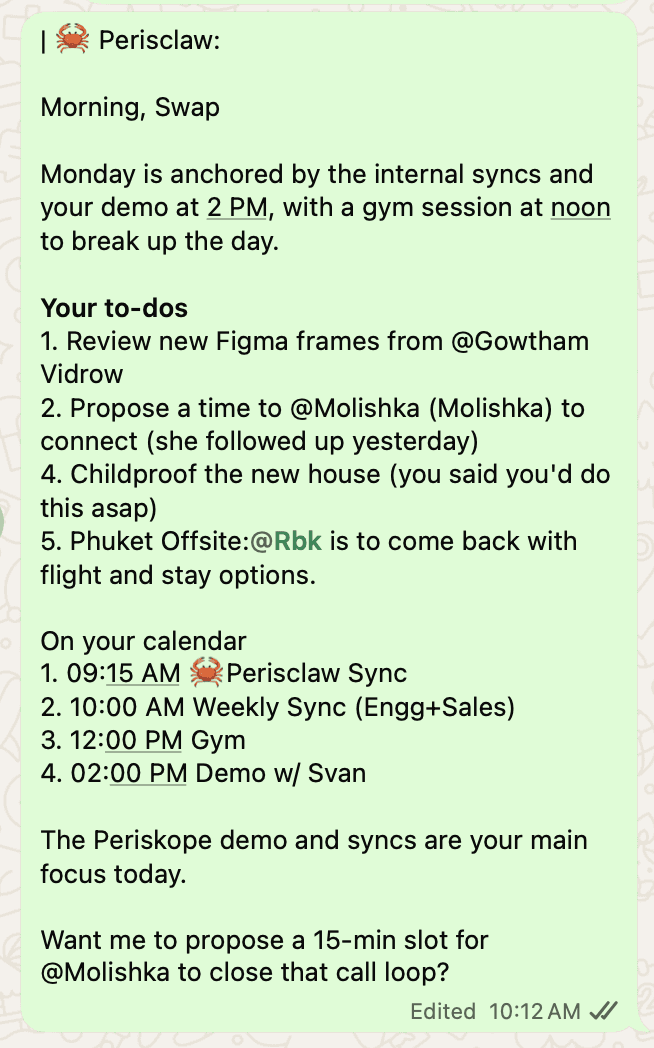
By default, anything Perisclaw writes to someone else on your request lands in your self-chat first and goes out only when you approve it, as you, with no assistant label. Follow-ups you set up in advance send as planned.
Using it with a team
Martin is a personal assistant for one person. Perisclaw also works in shared chats: type "/claw what did the client approve here and what's still open?" in a client group and the answer appears in that thread. A team plan, still rolling out as of November 2026, puts everyone on one bill while each person keeps their own number and assistant, and nobody, the owner included, can read anyone else's chats. Details are in Team plans.
What Perisclaw can't do
No phone calls: Perisclaw won't call a client or wake you up with a phone call. If calls are the job, Martin wins.
WhatsApp only for messaging: no SMS, iMessage or Telegram. You talk to Perisclaw in WhatsApp or its web and phone apps; your connected Gmail or Outlook is something it works on, not a way to reach it.
No bulk sending: it stops after 15 chats and asks before going further, because bulk messages can get a real number flagged.
The linked-device caveat: WhatsApp didn't build linked devices for outside tools, and its help centre warns that linking unofficial apps can lead to a ban. Perisclaw is built for normal personal use and stays clear of the bulk patterns WhatsApp's spam rules target, but nobody outside WhatsApp can promise zero risk.
How each one handles your data
Martin's privacy policy says its servers are in the United States and that what you send is shared with the AI providers it uses, including OpenAI. Perisclaw reads only the chats you allow: block a chat, or lock it with WhatsApp's Chat Lock, and it can't read, search or quote it. Your data is never used to train AI models, Perisclaw's or anyone else's, and Perisclaw is ISO 27001 certified. More in Privacy & security.
Which one should you pick?
Pick Martin if: you want an assistant you can phone, that calls and texts people for you, and your work lives in email and calendars on an iPhone.
Pick Perisclaw if: your clients, suppliers or team are on WhatsApp, in whatever country you work, and the problem is replies, promises and follow-ups getting lost there.
Use both: some people keep a general assistant for email and calls and let Perisclaw handle WhatsApp.
You can try Perisclaw with a 7-day free trial, no card needed. To compare Martin with Poke, Lindy and Tab as well, see the best AI assistant you can text, or read Poke vs Perisclaw.
FAQ
How much does Martin cost?
As of November 2026, Basic is $21 a month billed yearly or $35 billed monthly, and Pro is $30 a month billed yearly or $49 billed monthly. Both come with seven days free. Perisclaw has a 7-day free trial with no card, then a flat monthly price.
Does Martin work on WhatsApp?
Martin's site lists WhatsApp, but its docs now only list email and Slack as ways to message it, and Meta limits general-purpose AI assistants on its business platform to Brazil, the EU and EEA, and Türkiye. Test it in your country during the trial. Perisclaw works on your own WhatsApp number in any country where you use WhatsApp.
Can Martin read my WhatsApp chats?
No. Martin sees what you send it plus the inbox, calendars and Slack you connect. Perisclaw is linked to your WhatsApp number, so it can work with the chats you allow and skip any you block.
Can Perisclaw make phone calls like Martin?
No. Perisclaw messages people on WhatsApp from your number, after you approve. If you need an assistant that phones people, Martin is the better fit.
What's a good Martin AI alternative for WhatsApp?
Perisclaw, if your work happens in WhatsApp rather than email and phone calls. It runs on your existing WhatsApp or WhatsApp Business app number, in the language you write in.
If your work runs on WhatsApp, get an assistant that works inside it. Start your 7-day free trial →
Try Perisclaw free
Your personal AI assistant on WhatsApp. It reads the chats you allow and gets things done for you. 7-day free trial, no card needed.
Start for free