AI that drafts WhatsApp replies in your tone, for you to approve

A client asks for an update and you know what to say, but it's the fourteenth reply of the evening, so you send "ok will check" or leave it for tomorrow. The ChatGPT draft you tried last week came back sounding like a press release, with "I hope this message finds you well" for a supplier you've known for ten years.
You can get AI to draft WhatsApp replies in your tone and wait for your approval before anything is sent. Perisclaw does this on your own WhatsApp number: it learns how you write to each person, writes the reply in your self-chat, and sends it only when you react 👍 or say "send". Every edit you make teaches it, so the drafts need less fixing over time. If you'd rather use ChatGPT or Claude, the prompts further down work in any tool.
How Perisclaw learns your tone
AI drafts sound generic when the AI has never seen how you write. Perisclaw reads the chats you allow on your number, so it starts from real examples, and keeps learning in four ways:
How you talk to different people: you write to your mother, your co-founder and a new client in three different ways, and Perisclaw picks up those differences and matches the right one for whoever the reply is going to.
Your edits: shorten a draft once and it keeps them short; make it warmer and it remembers. Over time the first draft is closer to what you'd have written.
Your standing rules: "no emojis for the Board group", "always reply to Kabir in Hindi", "never start with 'Dear'". You say it once and it applies in every chat.
Your shorthand: tell it once that "the boss" is Rahul or "the standup" is a particular group, and it knows who you mean from then on.
It also remembers details about the people you talk to, like who prefers a text over a voice note or a friend's new job, so a reply can mention the right thing.
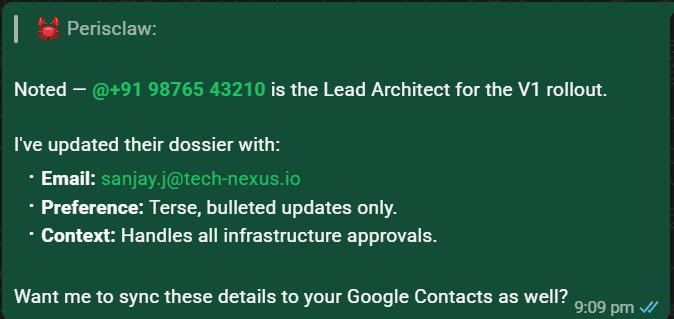
Ask "What do you remember about me?" and it lists what it knows and where each item came from; say "forget that" or "keep my replies to Priya formal" and it corrects itself. For something that must hold every time, like "never agree to a delivery date without checking with me", save it as a hard rule: Perisclaw reads it back to you and checks it before every send.

How the approval step works
By default, Perisclaw's Message other chats setting is "Ask me first". Here's what happens when you ask it to reply to someone:
You say, by text or voice note, "Tell Priya Friday at 3 works, and ask if she can bring the signed copy."
Perisclaw writes the message in your tone for Priya and shows it in your self-chat.
You react 👍 or ✅, or reply "send", and it goes out from your number, as you. If you want changes, say "shorter" or "drop the second line" and it writes a new version.
Drafts you don't approve expire after 24 hours, so nothing old goes out by accident. In the web app, the Today page shows your open tasks with a reply already typed in; edit it and press Send.
For people you message all the time, say "send to Ravi without drafts" and later messages you ask Perisclaw to send to Ravi skip the draft. Say "always draft for Ravi again", or choose Ask first next to his name in Settings → Permissions, to undo it. Everyone else still gets a draft first.
Automations and Missions you set up in advance send as planned once you've seen the plan; our guide to tracking WhatsApp follow-ups covers those.
Drafting from ChatGPT or Claude
If you already write with ChatGPT or Claude, connect your WhatsApp to them with Perisclaw, choose Read & write, and ask:
"Read my last 20 messages with Arjun and draft a reply to his question about the delivery date, in the same tone I usually use with him."
"Find every client chat where someone asked me for a quote this week and draft a short reply to each. Show me all of them before sending anything."
The AI reads the real conversation, so it copies how you write to that person. When it's ready to send, the Perisclaw plugin tells your AI to show you the exact message and wait for your go-ahead, and your AI tool also asks before it uses the sending tool. These messages don't wait in your self-chat; you approve them in ChatGPT or Claude. Setup takes about two minutes: see how to connect WhatsApp to ChatGPT, which also covers Claude.
Drafts from ChatGPT or Claude come out best when you ask the AI to read your past messages with that person first, as in the examples above. Inside WhatsApp, Perisclaw already has that history and your saved rules, so you can just say "reply to Arjun".
Prompts that get any AI to draft WhatsApp replies in your tone
These work in ChatGPT, Claude, Gemini or Perisclaw, whether or not the AI can see your chats.
1. Show it how you write. Examples beat descriptions. Paste five to ten real messages you sent to similar people:
"Here are 8 messages I've sent to suppliers. Notice how long they are, how I greet people, and what I never say. Then draft a reply to this message in the same style: [paste message]."
2. Write down your style once. Ask "From these messages, describe my writing style in 5 bullet points: length, greeting, sign-off, emoji use, words I use often", fix the result, and keep it to paste in again.
3. Say who it's for and what you want. "Reply to my landlord, polite but firm, saying I'll pay on the 5th, not the 1st, and don't apologise" gives a usable one.
4. Set the length. "Under 30 words, no greeting" removes most of the AI feel.
5. Ban the giveaways. "No 'I hope you're doing well', no 'Kindly', no exclamation marks, no bullet points." List the phrases you'd never type.
6. Match the language. "Reply in the same mix of Hindi and English he used" or "reply in Portuguese, informal, like I'd text a friend".
A full prompt that works well:
"Draft a WhatsApp reply to Neha, a client I've worked with for two years. We're friendly but she's paying the bills. She asked if we can deliver by the 12th. The answer is the 15th because the printer is late. Keep it under 40 words, no apology paragraph, offer to send a preview on the 10th, and write like my messages above."
What not to hand to AI
Some messages shouldn't be drafted by AI at all, or need a much closer read:
Money and commitments: prices, discounts, payment terms and delivery dates. Perisclaw never agrees to a price or makes a binding promise without checking with you, but in any tool, read the numbers twice.
Bad news and conflict: firing someone, a complaint from your biggest client, a family argument. These need your own words, even if they come out worse.
Condolences and personal moments: people can tell, and it matters to them that you wrote it.
Anything legal or medical: treat an AI draft as a starting point and check it with someone qualified.
Keep "send without drafts" for the colleague you message twenty times a day, not a client or anyone a mistake would cost you.
Is it safe to let AI draft my WhatsApp?
Perisclaw connects as a linked device, the same way WhatsApp Web does, and you can log it out from Linked devices at any time. Block any chat and it can't read, search or quote it, and your messages are never used to train AI models. Messages it sends for you go out as you, with no assistant label, which is one more reason to keep the approval step on for anything that matters.
WhatsApp's help centre warns that linking unofficial apps can lead to a ban. Perisclaw is built for normal personal use, drafting and sending replies you approve, and it stops after 15 chats if you try to send the same message to many people. Nobody outside WhatsApp can promise zero risk, so we don't. Details are in Permissions & access and Personal memory.
FAQ
Can AI draft WhatsApp replies in my own tone?
Yes. Perisclaw learns how you write to each person from the chats you allow and from your edits, then drafts replies in your self-chat. With ChatGPT or Claude, paste examples of your messages, or connect your WhatsApp so the AI can read the conversation first.
Is there an AI that drafts replies to clients for me to approve before sending?
Yes. Perisclaw's default is "Ask me first": it shows each draft in your self-chat and sends it only when you react 👍 or reply "send". From ChatGPT or Claude, the AI shows you the message and waits for your go-ahead.
Will it ever send without asking me?
Only where you've said it can: chats you've switched to "send without drafts", replies you ask for with /claw inside a chat, and Automations or Missions you've set up and approved. You can pause all sending with "pause everything" in your self-chat.
How long does it take to learn my style?
It starts from your existing chats, so the first drafts already use your usual greetings and length. Each correction you make is stored, so drafts need less editing the more you use it.
Get replies that sound like you, ready for your 👍. Start your 7-day free trial →
Try Perisclaw free
Your personal AI assistant on WhatsApp. It reads the chats you allow and gets things done for you. 7-day free trial, no card needed.
Start for free