What is Perisclaw? The AI executive assistant on WhatsApp, explained

Your work runs on WhatsApp, and so does everything that slips. A client asks for a revised quote in the morning, a vendor group needs a decision by lunch, and you promised someone a document "by Friday" in a chat you haven't opened since. By evening you're scrolling back through the day, trying to remember who is still waiting on you.
Perisclaw is an AI executive assistant that lives in your own WhatsApp. It connects to the number you already use as a linked device, the same way WhatsApp Web does, reads the chats you allow, and keeps track of the replies you owe, the promises you've made and the meetings coming up. You talk to it in your self-chat (the "message yourself" chat) or by typing /claw in any chat. It costs a flat monthly price after a 7-day free trial that needs no card.
What is Perisclaw, and how does it work on WhatsApp?
There's no new number, no bot to save as a contact and no app you have to switch to. You sign in at app.perisclaw.com, enter your WhatsApp number, and link Perisclaw by scanning a QR code or entering a pairing code on your phone. It then shows up under Linked devices in WhatsApp, next to WhatsApp Web, and you can log it out from there whenever you want.
After that, you use it in two places:
Your self-chat: this is Perisclaw's home. Ask it anything ("what needs my reply today?"), hand something off ("remind me to call the bank Friday"), or send a voice note on your way out of a meeting.
Any other chat, with /claw: type "/claw what did we decide here?" in a group and it answers right there, using that conversation as context. Outside your self-chat it stays silent until you call it, unless you've set it up to help in that chat.
It works with regular WhatsApp and the WhatsApp Business app, and it understands most widely used languages, so you can write or speak the way you normally do. There's a web app for sitting down to clear your list, and an Android app on Google Play (the iPhone app is in beta).
What Perisclaw does day to day
Most people start with the jobs they'd give a human assistant on day one.
Morning catch-up: a short message in your self-chat each morning with the chats that need a reply, what you promised, what's due, and your meetings if your calendar is connected.
Promises and follow-ups: when you write "I'll send the contract by Friday", Perisclaw picks it up as a task and closes it when you send the contract. Ask it to chase someone and it follows up from your number on the schedule you set, then stops when they reply.
Search by meaning: "find the office address Rahul sent last month" or "what price did we agree with the printer?" works across your chats, email, calendar and files, even when you don't remember the exact words.
Busy groups and voice notes: it summarises a group since Monday, lists what you need to decide, and reads the voice notes people send you.
Reminders and scheduled messages: "send this to Priya tomorrow at 9" or "remind me about this invoice on the 30th".
Your other apps: Gmail, Google Calendar, Drive, Sheets and Contacts, Microsoft 365, Slack and Notion, all from the same chat.
Longer jobs: a Mission takes on a goal that takes days ("get the signed agreement from the vendor by Friday and tell me if they push back"), and an Automation runs on a schedule, like asking each team lead for their numbers every Friday.
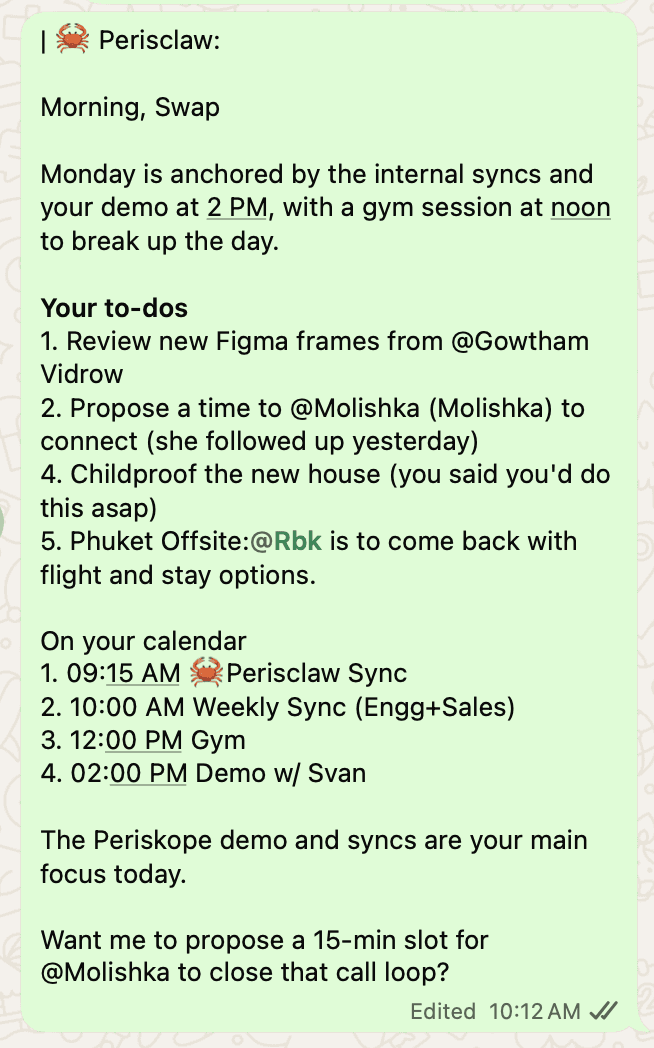
When you ask it to message someone else, it writes the draft in your self-chat and sends only after you approve it, by reacting with a thumbs up or replying "send". That's the default, and you can let specific chats skip the draft later.
Who Perisclaw is for
Perisclaw is built for people who run their work on WhatsApp and are the bottleneck in their own inbox: founders, operators, consultants, brokers and agents, and small business owners who juggle clients, vendors and teams across dozens of chats. If your day includes "I'll get back to you" messages you then forget, and groups where decisions get buried, it was made for you.
It's a personal assistant, so each person has their own. A team plan puts several people on one bill, each with their own number and private assistant, and nobody on the team, including the owner, can read anyone else's chats.
How much does Perisclaw cost?
Perisclaw has a 7-day free trial with no card needed, then a flat monthly price. One subscription covers Perisclaw in WhatsApp, the web and phone apps, and its use from ChatGPT, Claude and other AI tools. Current prices for personal and team plans are on the pricing page.
Plans are priced in US dollars; checkout may show your local currency, and new plans are paid by card. If a friend referred you, they can give you a code for an extra free month after your trial.
Is Perisclaw safe to use with your WhatsApp?
Giving an assistant access to your chats is a real decision, so here is how Perisclaw handles them, taken from its privacy and security documentation.
Your data is kept apart: your assistant runs in its own isolated environment and your data is never pooled with anyone else's. No one on the Perisclaw team reads it.
It's encrypted: your data and logs are encrypted with keys unique to you, which are derived when needed rather than stored.
No training: your data is never used to train AI models, Perisclaw's or anyone else's.
No telemetry: Perisclaw doesn't keep activity logs about how you use it. The only exception is feedback you choose to send, which you can see.
Independently audited: Perisclaw is ISO 27001 certified and goes through regular vulnerability testing.
You choose what it reads: block any chat in Settings, or say "never read" followed by the chat's name, and it can't read, search or quote it. Lock a chat with WhatsApp's Chat Lock and it's blocked automatically. Add /ignore to a single message and Perisclaw won't use it.
You can stop it any time: pause all sending with one setting, log the linked device out from WhatsApp, or delete your account and its data from Settings.
One honest caveat: Perisclaw connects as a linked device, which WhatsApp didn't build for outside tools, and WhatsApp's help centre warns that linking unofficial apps can lead to a ban. Perisclaw is built for normal personal use, reading your chats and sending replies you approve, and it stops and checks with you after 15 chats if you try to send the same message to many people, because bulk sending is what WhatsApp's spam rules target. Nobody outside WhatsApp can promise zero risk, so we don't. We go deeper on this in a private AI assistant for WhatsApp.
Does Perisclaw work with ChatGPT and Claude?
Yes. The same account lets you use ChatGPT, Claude, Cursor and other AI tools with your WhatsApp, so you can ask "what needs my reply on WhatsApp?" from the AI you already work in.
ChatGPT: install the Perisclaw app in ChatGPT from Plugins and connect your Perisclaw account.
Claude: go to Customize, then Connectors, choose Add custom connector and paste
https://api.perisclaw.com/mcp/plugin. This works on every Claude plan, including Free.Cursor, Codex and other MCP tools: add the same address as an MCP server and sign in.
Each time you connect a tool, you choose Read only or Read & write. Our guide to connecting WhatsApp to ChatGPT has the full steps for each tool.
What Perisclaw won't do
Knowing the limits helps you decide whether it fits.
It won't broadcast: it stops after 15 chats when you send the same message to many people, and adds people to groups 10 at a time. For real announcements, use a WhatsApp Community, channel or invite link.
It isn't a customer chatbot: it doesn't run on the WhatsApp Business API or answer your customers at scale. It's your assistant, on your number.
It won't commit you: it never agrees to a price, spends money or makes a binding promise without checking with you, even inside an Automation.
It won't share your private context: when it acts in someone else's chat, it won't reveal your other conversations, calendar, email or notes, even if they ask.
It can't see blocked or restricted chats: chats you block, lock with Chat Lock, or that use WhatsApp's newer Restricted chat setting are off limits to it.
One number per account: each Perisclaw account connects to one WhatsApp number.
Is Perisclaw worth it?
It depends on how much of your work runs through WhatsApp. If you handle dozens of chats a day, owe people replies across groups, and lose track of what you promised, an assistant that reads those chats and keeps the list for you saves real time and the embarrassment of the forgotten follow-up. If you only get a handful of messages a day, or what you need is a chatbot for your customers, it isn't the right tool.
The trial is the honest test: use it for a week, see what your first morning catch-ups turn up, and decide then. If you're comparing it with other assistants, we've put Perisclaw and Instinct side by side.
How to start with Perisclaw
Go to app.perisclaw.com and choose Continue with Google.
Enter the WhatsApp number you already use, with its country code.
Link Perisclaw from WhatsApp's Linked devices screen by scanning the QR code or entering the pairing code.
Open your self-chat and send "hello". Perisclaw asks a few short questions (your name, timezone, what matters to you), and you can connect Google now or later.

Then ask the question that shows you what it can do: "What needs my attention today?"
FAQ
Is Perisclaw a separate WhatsApp number or bot?
No. It runs on your own number as a linked device and lives in your self-chat, so there's no new contact to save and nothing for the people you talk to to install.
Can people tell when Perisclaw replies?
Messages it sends for you, after you approve them, go out as you with no label. When you call it with /claw in a chat, its reply is clearly labelled as Perisclaw.
Does Perisclaw read all my chats?
It reads the chats you allow. Any chat you block, or lock with WhatsApp's Chat Lock, is off limits: it can't read, search, summarise or quote it.
Does Perisclaw use my messages to train AI?
No. Your data is never used to train AI models, Perisclaw's or anyone else's.
Do I need the WhatsApp Business API?
No. It works with the number you already use, on regular WhatsApp or the WhatsApp Business app.
What happens when the trial ends?
If you've added a card at checkout, your plan continues. If not, your assistant pauses until you choose a plan from Settings, then Billing.
Your executive assistant, on the WhatsApp you already use. Start your 7-day free trial →
Try Perisclaw free
Your personal AI assistant on WhatsApp. It reads the chats you allow and gets things done for you. 7-day free trial, no card needed.
Start for free
