
Meta AI in WhatsApp vs Perisclaw: which one do you need?

If you run your work on WhatsApp, you know the feeling. It's 9pm, you scroll back through the day, and you find the client who asked for a revised quote at 11am. You meant to reply. Three groups have 80 unread messages each, and somewhere in one of them is a decision only you can make.
WhatsApp already has an AI built in, Meta AI, so it's natural to ask whether that can handle this, and sometimes it can. Meta AI in WhatsApp is a free chatbot: it answers what you ask it and sees only the messages you send it, @mention it in, or share with it. Perisclaw is an executive assistant that runs on your own WhatsApp number: it reads the chats you allow, notices what you promised, tells you who's waiting on a reply, summarises busy groups, and handles your email and calendar. If you want quick answers, Meta AI is enough. If things slip through the cracks of your WhatsApp, you want Perisclaw.
The short version
Meta AI in WhatsApp | Perisclaw | |
|---|---|---|
What it is | A chatbot you message, @mention, or add to a group | An executive assistant on your own WhatsApp number |
What it can see | Messages you send it, @mention it in, or forward to it; new messages in a group it has been added to | The chats you allow, so it has context across them |
Unread summaries | One chat at a time, if Message Summaries has reached you | A morning catch-up across all your chats, plus summaries on request |
Tracks what you promised | No | Yes, and closes items when they're done |
Follows up with other people | No | Yes, on the schedule you set |
Email, calendar, Drive | Not in WhatsApp | Yes |
Use it from ChatGPT or Claude | No | Yes |
Price | Free | 7-day free trial, then a flat monthly price |
What Meta AI in WhatsApp can do
Meta AI is free and already in your WhatsApp. As of November 2026, WhatsApp's help pages describe these ways to use it:
Chat with it directly: ask questions, get recommendations, rewrite a reply so it sounds politer, translate a message, or create an image.
Forward it a message: send it something you received and ask what it means or how to answer.
Mention it in a group: type @Meta AI in a group to ask it something there.
Add it to a group as a member: it can then read and reply to new messages in that group, plan things and answer questions for everyone. Every member sees a notice when it joins, and group admins can remove it.
Summarise unread messages: Message Summaries gives you a short private summary of the unread messages in one chat. It's off by default and rolling out by country and language (it started in the US, in English), so you may not have it yet.
If that's what you want from AI on WhatsApp, Meta AI is a fine choice.
What Meta AI can see in your chats
WhatsApp's help center is clear on this: only messages that mention @Meta AI, or that you choose to share with it, can be read by Meta. Your other personal chats stay end-to-end encrypted and Meta AI can't see them. The exception is a group where someone has added Meta AI as a member; there, Meta can read new messages in that group. Message Summaries use what Meta calls Private Processing, which WhatsApp says lets the AI summarise your messages without Meta or WhatsApp being able to read them.
What you do share falls under Meta's AI Terms of Service, and Meta says it may use your prompts, the messages you share and your feedback to improve its AI.
Where Meta AI stops
That privacy design is also its limit for work. Meta AI only knows what you hand it, so it can't follow your conversations, and most of the stress of running work on WhatsApp isn't a lack of answers. It's the things that get lost: the revised quote you never sent, the vendor group waiting on your decision, the "I'll send it tomorrow" you typed last week and forgot. A chatbot can't help with any of these unless you notice them yourself and ask, and by then you've already done the hard part.
What about Meta Muse, and ChatGPT on WhatsApp?
Meta Muse is Meta's newer AI agent, which can take actions for you on the web. As of November 2026 it's available in the US, Canada, Japan and Singapore, and Meta hasn't announced dates for India, Brazil, Indonesia, Mexico or most other countries where WhatsApp runs daily work. We cover it in more detail in Is Meta Muse available in India?
ChatGPT on WhatsApp (the 1-800-ChatGPT number) stopped working after January 15, 2026, when WhatsApp changed its terms for general-purpose AI chatbots; OpenAI brought it back in July 2026, but only for WhatsApp numbers in the European Economic Area. If you want ChatGPT to see your own WhatsApp, you can connect WhatsApp to ChatGPT with the Perisclaw app instead.
What Perisclaw does differently
Perisclaw is built for the problems above. It runs on your own WhatsApp number as a linked device, the same way WhatsApp Web does, reads the chats you allow, and works in the background. You talk to it in your self-chat (your "message yourself" chat), or type /claw in any chat or group.
What needs you: every morning you get a short catch-up in your self-chat: the chats that need a reply, what you promised, and what's due, plus your meetings if your calendar is connected.
Your promises: when you write "I'll send the contract by Friday", Perisclaw picks it up as a task. When you send the contract, it closes the task on its own. If you haven't, it comes back in your catch-up.
Follow-ups: "Ask Rahul for the signed agreement on Friday. If he hasn't replied by Monday, follow up, and tell me if he still hasn't by Wednesday." Perisclaw sends those follow-ups from your number and stops when he replies.
Voice notes: send one on your way out of a meeting ("remind me to call the landlord Thursday and email the deck to Ana") and it handles both. It also reads voice notes other people send you.
Your other tools: Gmail, Google Calendar, Drive and Sheets, from WhatsApp. "Find the email where the supplier confirmed the delivery date."
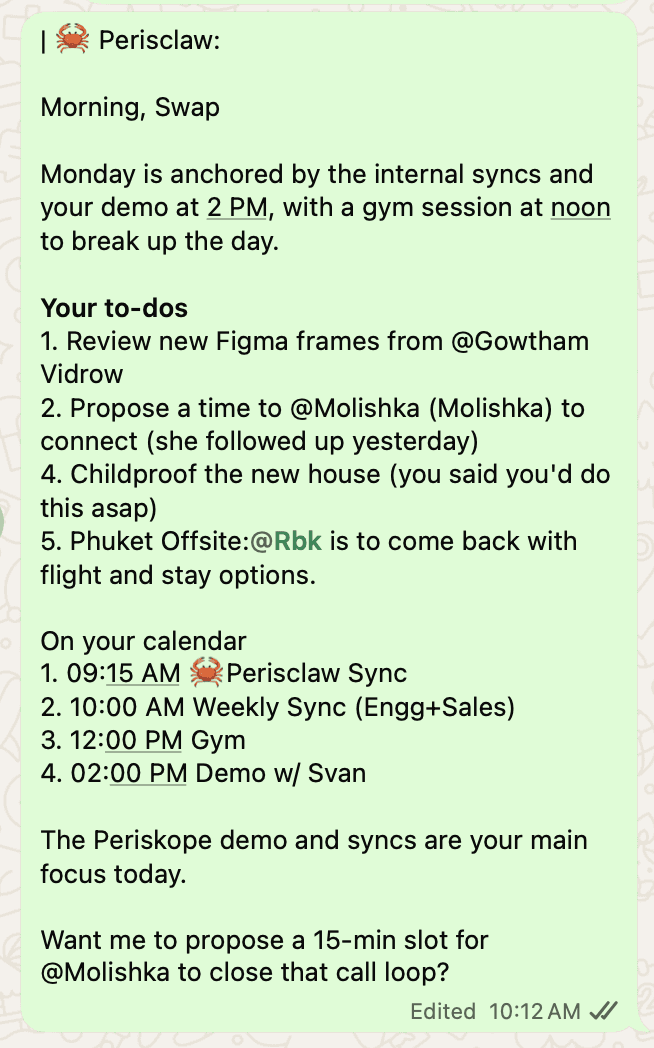
By default, anything Perisclaw writes to someone else on your request shows up in your self-chat first and goes out only when you say "send". Follow-ups you've set up in advance send as planned.
Meta AI summaries vs a Perisclaw catch-up
Meta AI's Message Summaries work inside one chat. You open a busy group, tap to summarise, and get a few bullet points about the unread messages, privately. It's free, and it's genuinely useful for a single noisy group. But you still have to open each chat, it only covers what's unread, and nothing carries over: if the summary says someone asked you for an invoice, remembering to send it is still your job.
A Perisclaw catch-up works across all the chats you allow and tells you which ones need you and why. You can also ask for exactly the cut you want:
"Summarise the vendor group since Monday and list anything I need to decide."
"Catch me up on my client chats: unanswered questions first."
"What did Priya say in that voice note?"
And anything that needs doing becomes a task that stays open until it's done. For more ways to do this, including free ones, see how to summarize WhatsApp groups and voice notes with AI.
Can you turn off Meta AI in WhatsApp?
No. As of November 2026, WhatsApp's help pages describe no setting that removes Meta AI from the app. If you just want it to stop showing up, here's what you can do:
Delete your chats with it: open the Meta AI chat, press and hold a conversation, and choose Delete chat.
Delete what it kept: type /reset-ai in a chat with Meta AI to delete its copy of that chat, or /reset-all-ais to delete it across every chat you've used it in.
Remove it from a group: if you're a group admin, open the group info, tap Meta AI in the member list, and choose Remove from group.
Leave summaries off: Message Summaries and writing help are off by default. You'll find them under Settings, Chats, Private Processing.
Use Restricted chat for sensitive chats: this newer setting, still rolling out as of November 2026, stops people in that chat from using Meta AI features there, and also blocks exporting the chat and auto-saving its media. It also blocks linked devices for that chat, which includes WhatsApp Web and assistants like Perisclaw, so Perisclaw won't see a restricted chat at all.
Which one should you use?
Use Meta AI if you want a free chatbot for questions, translation and writing help inside WhatsApp, or a quick summary of one busy chat.
Use Perisclaw if your work runs on WhatsApp and you lose track of replies, promises and follow-ups.
Use both: they don't get in each other's way.
Perisclaw has a 7-day free trial with no card needed, so you can see what your first morning catch-up turns up before deciding.
How Perisclaw handles your chats
Perisclaw reads the chats you allow; block a chat and it can't read, search or quote it. Your data is never used to train AI models, and you can log it out any time from Linked devices in WhatsApp. Details are in Privacy & security and Permissions & access.
FAQ
Is Meta AI in WhatsApp good enough as a personal assistant?
For questions, translation and writing help, yes. For work, it only sees what you send it, so it can't tell you who's waiting on you or remind you about promises made in other chats.
Can Meta AI read my WhatsApp chats?
Only the messages you send it, @mention it in, or forward to it, plus new messages in any group where someone has added it as a member. Your other chats stay end-to-end encrypted.
Which AI can summarise all my unread WhatsApp chats every morning?
Meta AI's summaries work one chat at a time. Perisclaw sends a morning catch-up across all the chats you allow, with what needs your reply and what's due.
What are the alternatives to Meta AI on WhatsApp?
If you're searching "alternativas a Meta AI en WhatsApp" or "alternatif Meta AI di WhatsApp": for a smarter chatbot, use ChatGPT or Claude in their own apps. For an assistant inside your own WhatsApp, Perisclaw works on your regular WhatsApp or WhatsApp Business app number.
Can I still use ChatGPT on WhatsApp?
The 1-800-ChatGPT number only works for WhatsApp numbers in the European Economic Area now. Anywhere else, you can connect your WhatsApp to the ChatGPT app with Perisclaw and ask ChatGPT about your own chats.
Stop losing track of what's on WhatsApp. Start your 7-day free trial →
Try Perisclaw free
Your personal AI assistant on WhatsApp. It reads the chats you allow and gets things done for you. 7-day free trial, no card needed.
Start for free

