Get a daily WhatsApp briefing: pending replies, calendar and email in one message

You open WhatsApp at 8am to 60 unread chats, Gmail has its own pile, and your calendar is in a third app. You skim, reply to the two loudest people, and get on with the day. At 4pm you remember the client who asked you something yesterday, whose chat you read on the way to a meeting and meant to answer later. That's how most missed replies happen: you saw the message, so nothing is unread anymore, and nothing brings it back.
A daily WhatsApp briefing fixes that with one message each morning: today's meetings, the chats still waiting on your reply, what you promised that's due, what others owe you, and the few emails that need you. You can build one by hand in about 10 minutes a day, ask ChatGPT or Claude for it with your WhatsApp connected, or let Perisclaw send it to your WhatsApp automatically every morning and keep track of every unanswered chat in between.
What a good daily WhatsApp briefing contains
A briefing is worth reading only if it's short and you can act on it from your phone. The useful ones have five parts:
Today's calendar: meetings in order, any clash, and who you're meeting, with a line on what you last discussed.
Needs your reply: people who asked you something and are still waiting, with how long they've waited.
Your promises: what you said you'd send or do that's due today or already late.
Waiting on others: what people promised you that hasn't arrived, so you can nudge them.
Email that needs you: replies and follow-ups only, not newsletters.
Two rules keep it usable. Keep it to about ten lines, because a 40-item briefing is just another inbox. Number the items, so you can deal with them by number instead of hunting for the chat.
Option 1: a 10-minute manual routine (free)
You don't need any tool to start:
Open WhatsApp and tap the Unread filter at the top of your chat list. It shows chats you haven't opened, plus any you marked as unread.
During the day, when you read something you can't answer yet, long-press the chat (or swipe right on iPhone) and mark it as unread, or long-press the message and use Remind Me to bring it back later.
Check your calendar and Gmail, then write the five parts above as a short list in your self-chat (the "message yourself" chat), so it's in the app you'll have open all day.
This works if you're disciplined. It breaks the day you forget to mark a chat, and it can't see promises buried in groups, so it misses exactly the replies you're trying not to miss.
Option 2: ask ChatGPT or Claude each morning
If you already use ChatGPT or Claude, connect your WhatsApp to it with Perisclaw (Read only is enough for a briefing) and connect your Gmail and Google Calendar in the same app. In ChatGPT, Gmail and Google Calendar are under Settings → Apps; in Claude, add them under Customize → Connectors. Then ask:
"Using my WhatsApp, Gmail and Google Calendar: list today's meetings with anything I should know for each, the WhatsApp chats where someone is waiting on my reply (who, what they asked, how long ago), anything I promised that's due, and emails that need a reply. Keep it under 12 lines, numbered, most urgent first."
ChatGPT can also run a prompt like this every morning as a scheduled task; check the first few runs to make sure it actually reads your WhatsApp. The catch with this option is memory: the AI reads your chats fresh each time, so it can miss a promise from last Tuesday unless it happens to search for it. Our guide to connecting WhatsApp to ChatGPT covers setup.
Option 3: Perisclaw's morning briefing on WhatsApp
Perisclaw runs on your own WhatsApp number as a linked device and keeps a running list of open work from your chats: what you promised, who's waiting on your reply, and what others owe you. Because it tracks these all day, the morning briefing doesn't depend on a fresh search. Each morning your self-chat gets the most important open items, what people are waiting on, and your meetings if your calendar is connected, including who you're meeting and what's new with them since you last spoke.
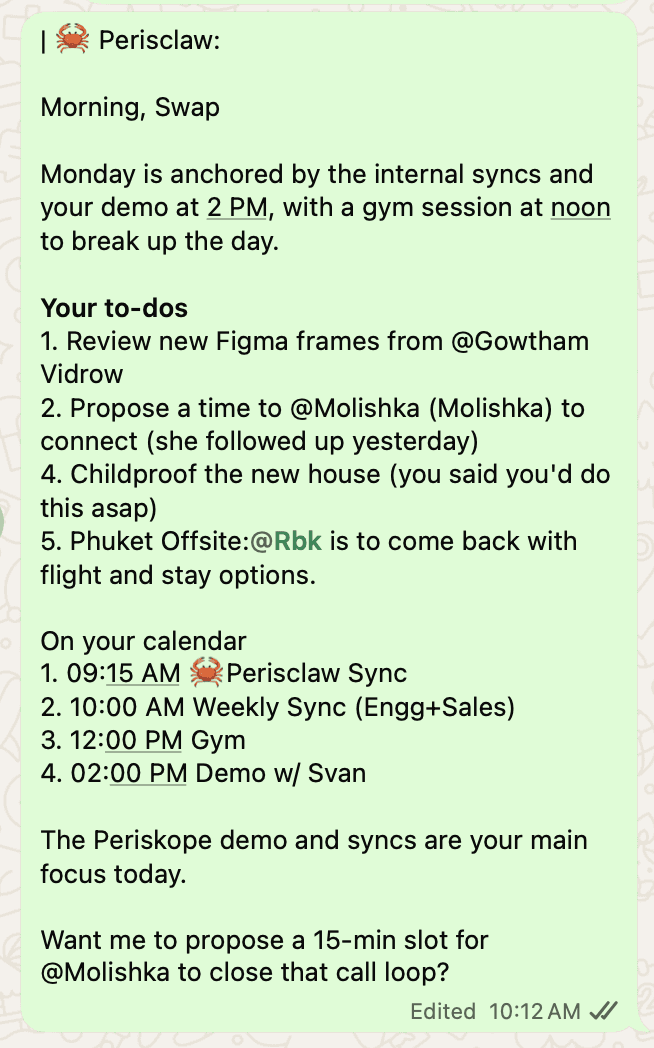
Connect Gmail and Perisclaw checks new mail every 15 minutes, skipping spam, promotions and social mail, and turns emails that need a reply into tasks next to your WhatsApp ones, with a draft ready. Nothing is sent until you send it. With Google Calendar connected (or Outlook through Microsoft 365), you can also ask for the shape of your day at any point:
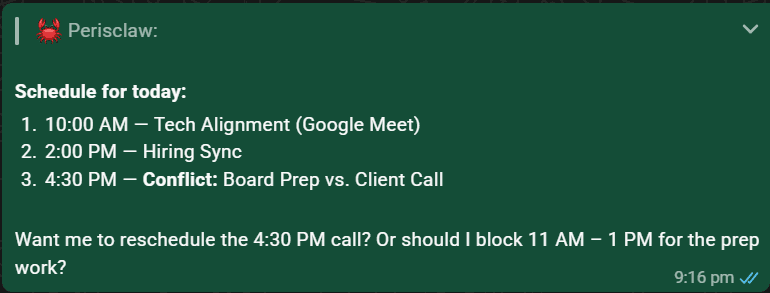
You act on the briefing by replying in your self-chat: "2 is done" closes the second item, "snooze the venue follow-up until Tuesday" brings one back later, and "draft a reply to Priya" writes the message for you to approve. Afternoon updates, an evening review and a weekly review are optional.
You can shape what it says. Open the briefing in Work in the web app and write under Digest instructions, for example "Morning: start with anything from my family" or "All digests: keep it under 10 lines", or just say "skip groups in my evening digest" in your self-chat. If you want a briefing with a fixed format and time, describe it once: "Every morning at 8, send me my day: my meetings, anything I've promised people, chats waiting on my reply, and anything going overdue."
How to track who owes you a reply, and who you owe
The briefing is the morning view. During the day, Perisclaw labels each chat Needs You, Waiting or Later as conversations change, in WhatsApp and in Gmail, so your chat list shows where each conversation stands. "Waiting" is the list of people who owe you something; you can switch the labels off in Settings → Permissions if you'd rather not have them.
You can also ask at any time:
"Who has been waiting on my reply for more than two days?"
"What am I still waiting on from the vendors?"
"Is anyone in the client groups still waiting on me?"
When you have 20 minutes to clear the backlog, open Today in the web app at app.perisclaw.com. Every open task sits on the left, the chat it came from in the middle with a reply already drafted, and Perisclaw on the right to change it. Edit the draft, send it, mark the task done, and the next one opens. To have Perisclaw chase people for you until they reply, see how to track WhatsApp follow-ups with AI.
A daily routine that keeps WhatsApp under control
Morning (5 minutes): read the briefing, close what's done by number, ask for drafts for the rest.
Midday (10 minutes): clear the Needs You chats, from your phone or in Today.
Evening (optional): turn on the evening review and snooze whatever's left to tomorrow on purpose, instead of letting it slide.
What gets you to a calm inbox isn't answering everything at once; it's knowing nothing is slipping, which is what the list is for.
FAQ
How do I get a daily briefing on WhatsApp with my calendar, emails and pending replies?
Connect your WhatsApp to Perisclaw, then connect Google Calendar and Gmail. You get a morning briefing in your WhatsApp self-chat with meetings, chats waiting on your reply, your promises, and emails that need you. You can also get one by asking ChatGPT or Claude each morning with Perisclaw, Gmail and Calendar connected.
How do I stop forgetting to reply on WhatsApp?
Most forgotten replies are chats you read but didn't answer. Mark them unread or use Remind Me if you do it by hand; Perisclaw notices them for you, labels them Needs You and brings them back in the next briefing.
How can I track who owes me a reply on WhatsApp?
Perisclaw tracks what people promised you as "Waiting" items, labels those chats Waiting, and closes the item when the thing arrives. Ask "what am I still waiting on?" any time.
Is there an AI that reads my WhatsApp chats and tells me who I need to reply to?
Yes. Perisclaw reads the chats you allow on your own number and tells you who's waiting on you, in the morning briefing or when you ask. You can ask in Spanish too ("¿a quién tengo que responder?"), or in most other widely used languages. You can block any chat from being read.
Is there an AI that organizes my WhatsApp chats and reminds me to reply?
Yes. Perisclaw labels your chats Needs You, Waiting or Later, and reminds you in your daily briefing. It works in Portuguese too ("organiza minhas conversas do WhatsApp e me lembra de responder"). It works with regular WhatsApp and the WhatsApp Business app.
Start every day knowing who's waiting on you. Start your 7-day free trial →
Try Perisclaw free
Your personal AI assistant on WhatsApp. It reads the chats you allow and gets things done for you. 7-day free trial, no card needed.
Start for free